SteonMod
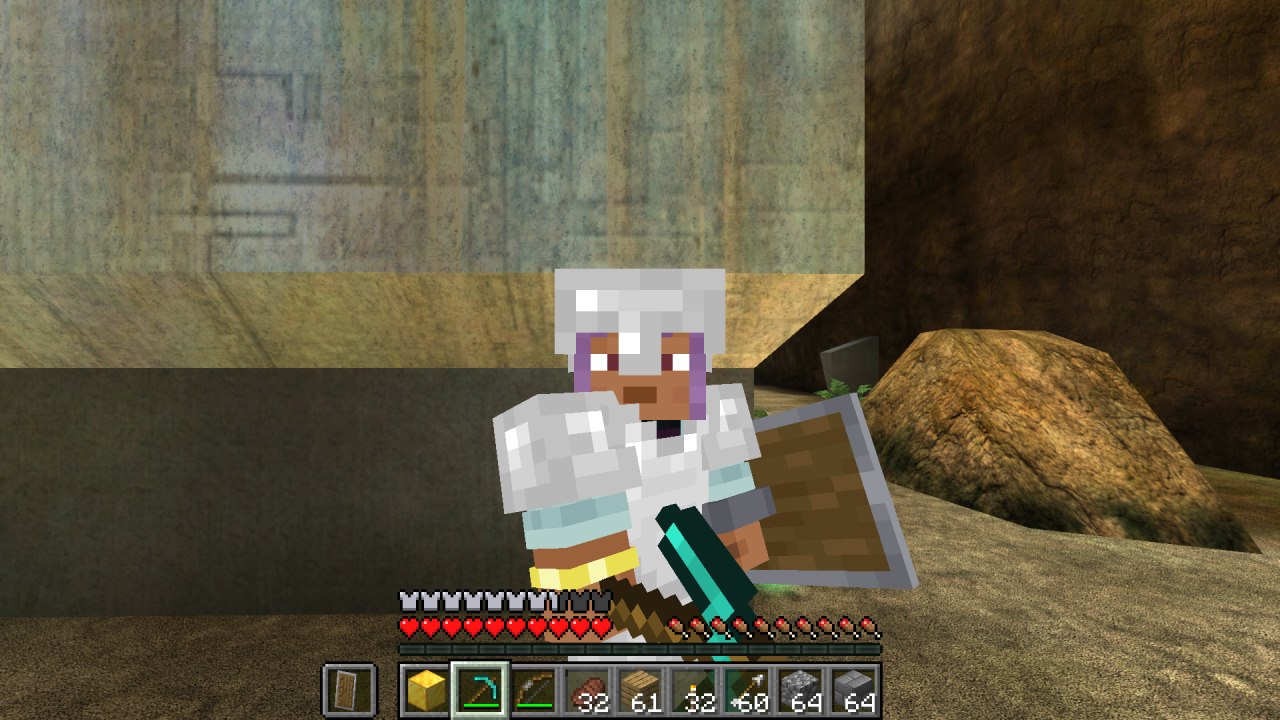
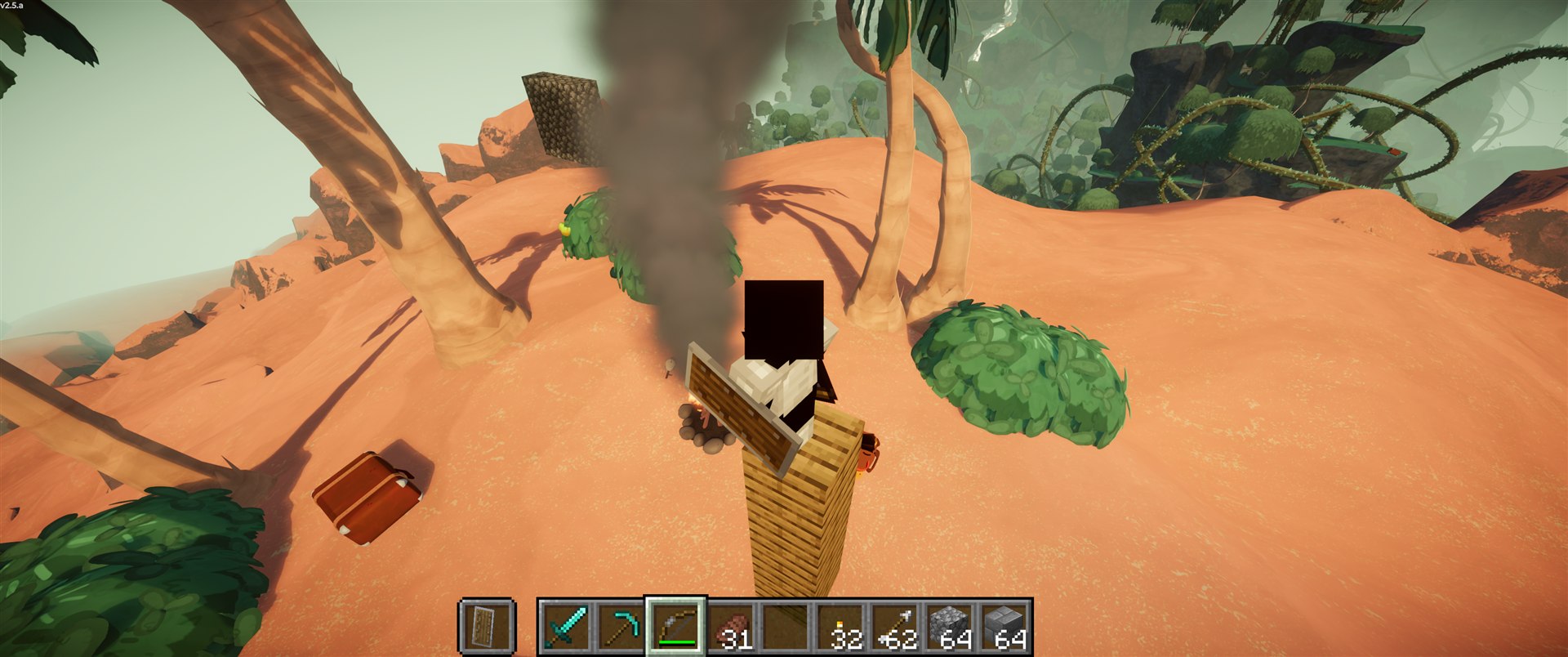
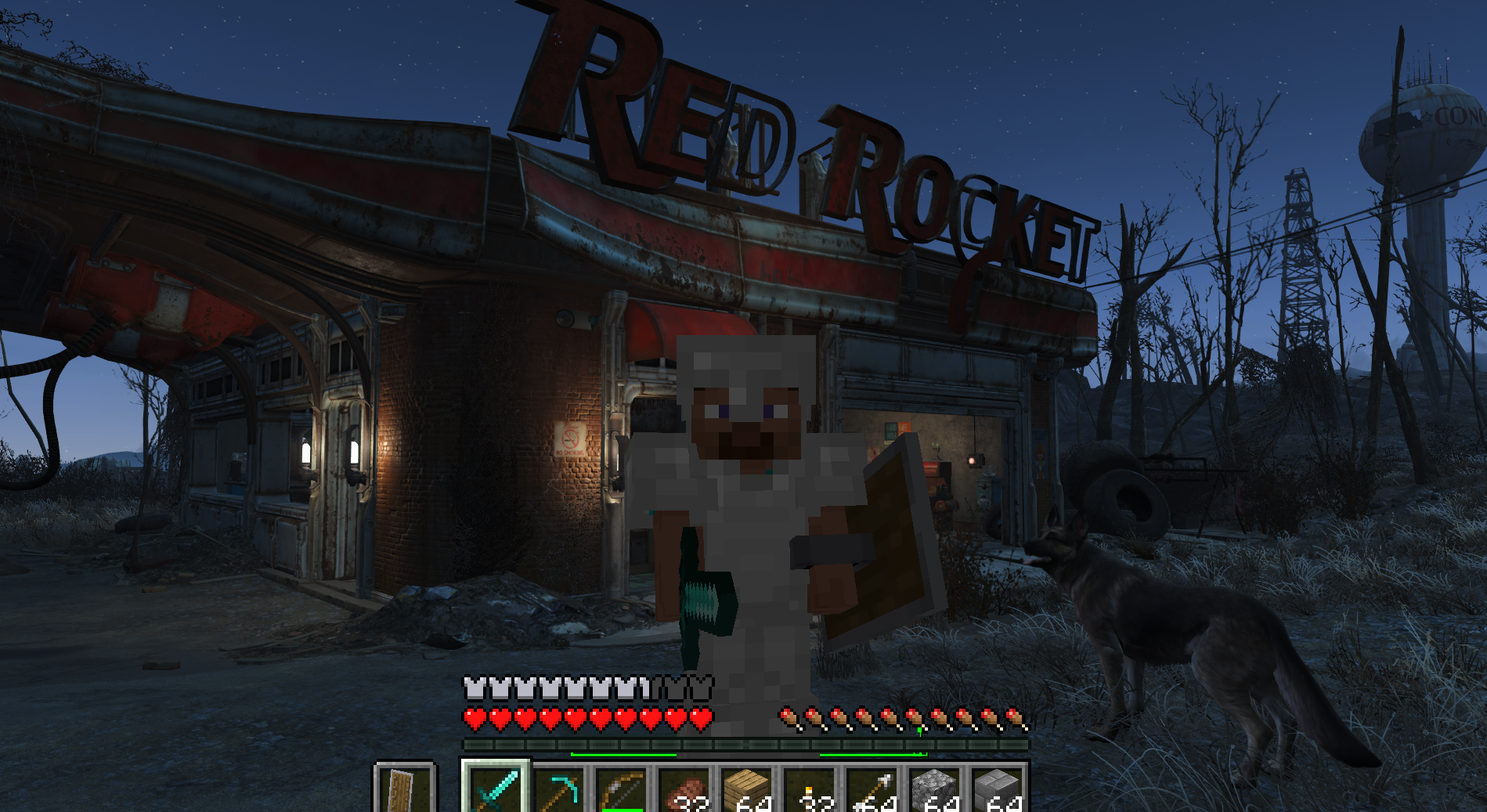
ValCraft screenshot
PassthroughPlayable

ValCraft

Play Valheim's world as a Minecraft player: Minecraft movement, inventory, blocks, combat and chat inside Valheim's terrain, weather and dungeons.

Minecraft (with the ValCraft Fabric mod) runs hidden and simulates the player. A BepInEx plugin in Valheim sends Minecraft the collision around you, puppets your Valheim character, draws Minecraft's blocks, entities and HUD in Valheim's frame, and carries combat and loot between the games. Comes with an optional guided installer.

What you need

  • Valheim with a mod manager (Gale, r2modman or Thunderstore Mod Manager); the release brings BepInEx
  • Minecraft: Java Edition (ValCraft unpacks its own portable Prism Launcher the first time)

ValCraft

A passthrough mod: Minecraft and Valheim run at the same time and talk through shared memory. You play Valheim's world as a Minecraft player, with Minecraft's movement, inventory, HUD, hand, blocks, combat and chat inside Valheim's terrain, lighting, weather, creatures and dungeons.

Neither game is rewritten. Minecraft (with the ValCraft Fabric mod) runs hidden and simulates the player. A BepInEx plugin in Valheim:

  • sends Minecraft Valheim's collision around the player;
  • puppets the Valheim character to where Minecraft says;
  • draws Minecraft's blocks, entities, particles, items and HUD in Valheim's frame;
  • carries combat and loot between the two.

Based on SkyCraft by chasmlol (Minecraft in Skyrim). The Fabric mod in fabric/ is a fork of SkyCraft's (MIT, see NOTICE.md). The Valheim side is new.

The earlier, non-passthrough ValCraft (Minecraft mechanics rebuilt inside Valheim) is now MinecraftMode.

Play

New here? Follow INSTALL.md. In short:

  1. Download LoAlCo-ValCraft-.zip from Releases

    and import it into a Gale profile (File, then Import, then Local mod). It brings BepInEx with it. Prefer a guided setup? Run the optional ValCraft-Installer-.exe from the same page instead: it walks you through everything, with Gale, r2modman or the Thunderstore Mod Manager.

  2. Launch the game from your mod manager.
  3. First time only: Valheim unpacks ValCraft's own Minecraft (a portable Prism Launcher with a

    ready Minecraft 26.3 + Fabric instance) to %LOCALAPPDATA%\ValCraft and starts Prism Launcher. Alt-Tab to it, click through its quick setup, and add your Microsoft account. Prism downloads Minecraft, Fabric and Java (a few minutes).

  4. From then on it's automatic: Minecraft starts hidden with Valheim, opens a world of its own for

    each Valheim world, and quits when Valheim closes. Valheim says "ValCraft: Minecraft is ready" once they're linked.

You need: Valheim on Steam, a Microsoft account that owns Minecraft: Java Edition, and about 3 GB of free RAM for Minecraft on top of Valheim.

To use your own launcher instead, set [Minecraft] Launcher / Arguments in BepInEx/config/loalco.valcraft.cfg, or StartWithValheim = false and start Minecraft yourself.

Controls (while Minecraft drives)

KeyDoes
Mouse, WASD, Space, Shift, Ctrl, 1-9, E, Q, T, F5Minecraft, as usual
GValheim "use": doors, chests, portals, beds, traders
Esc / MValheim's menu / map
OMinecraft's options menu
F7Hand the controls back to Valheim (and again to return)
F8Block terrain on/off: Valheim's ground as real Minecraft blocks

Changing keys: Minecraft's own keys (movement, inventory, hotbar, ...) are changed in Minecraft's options: press O, then Controls. ValCraft's keys above (F7, F8, G, O, M, and Alt for rotating) are in [Controls] of BepInEx/config/loalco.valcraft.cfg (or your mod manager's config editor), as Unity key names such as F7, G or LeftAlt. Changes apply right away, without restarting.

Optional: ConfigurationManager isn't needed, but it's handy for changing ValCraft's settings (keys included, with a key picker) mid-game with F1 instead of through your mod manager. ValCraft works with it: its window keeps the keyboard and mouse away from Minecraft while it's open, and F1 doesn't also hide Minecraft's HUD. Valheim keeps those keys, so pick ones Minecraft doesn't use; if you change Valheim's map key in Valheim's settings, set Map to the same key.

Holding a Minecraft hoe or the Build Hammer (Valheim's build mode):

KeyDoes
Right clickValheim's build menu
Left clickPlace the piece / use the hoe tool
Middle clickRemove a piece (hammer)
Alt + mouse wheelRotate the piece (the wheel alone still scrolls the hotbar)
ShiftPlace freely, without snapping

What works

  • Movement: Minecraft physics on Valheim's terrain, rocks, trees, buildings and dungeons, and swimming in Valheim's sea.
  • Building: placing and breaking Minecraft blocks in Valheim's scene, lit by its sun, shadows and fog. Torches and lava light the world, and Valheim's creatures bump into your builds.
  • First person: Minecraft's hands and held items are drawn in Valheim's scene, lit and shadowed by its sun, weather and lightning.
  • Explosions: TNT and creepers blow craters in Valheim's ground and smash its trees, rocks and buildings; both are multipliers in [Explosions]. The stone and wood they knock loose gathers into stacks, so a big blast doesn't leave hundreds of loose drops.
  • Boats: Minecraft boats and rafts float on Valheim's sea, lakes and rivers, ride and tilt with its waves, and row at water speed. Place them on the water or on the shore and push them in.
  • Underwater: diving under Valheim's sea (or into Minecraft water) gets fog, a tint, the surface seen from below, and muffled world sounds.
  • Minecraft things: entities (burning ones on fire), particles, chests and furnaces, TNT, arrows, fishing lines, leads, dropped items, and your own Minecraft body in third person.
  • Combat: Minecraft weapons and arrows hit Valheim creatures, and their hits come back as Minecraft damage, with armor and shields.
  • Minecraft mobs: they walk Valheim's terrain (around its rocks, logs and trees), and Minecraft's monsters and iron golems hunt Valheim's hostile creatures. How hard they plan their way is [Mobs] Pathfinding in the config (High, Balanced, Low) for slower PCs.
  • Tools: axes chop trees and pickaxes mine rocks, with Valheim's tool tiers. Shovels dig soil (dirt, grass, sand, snow); rock (steep slopes and paved ground) takes a pickaxe.
  • Hoe: a Minecraft hoe works like Valheim's: level ground, raise ground, paths and paved roads, from Valheim's own hoe menu. Stone costs come out of your Minecraft cobblestone.
  • Building (experimental): the Build Hammer (crafted from planks and sticks: three planks on top, planks either side of a stick, a stick below) builds with Valheim's own pieces, menu and workbench rules. The costs are Minecraft items from your inventory, shown with Minecraft's icons (Wood = oak logs, Stone = cobblestone, Surtling Core = fire charge, ...). Every piece is unlocked for now. Creative builds for free.
  • Pausing: pausing Valheim when you play alone pauses Minecraft too.
  • Bosses: the use key (G) at an altar, boss item stand or locked door offers its item for you, from your Minecraft inventory or the hidden Valheim inventory, and says where it came from. Every boss's summoning item and drops are ValCraft Minecraft items, redrawn from Valheim's icons (Deer Trophy, Ancient Seed, Withered Bone, Dragon Egg, Fuling Totem, Sealbreaker, Bell, Hard Antler, Swamp Key, Wishbone, Dragon Tear, Torn Spirit, Majestic Carapace, Kindled Ribs and the boss trophies). Boss hits are scaled like any other creature's.
  • Loot: Valheim loot goes into the Minecraft inventory (wood becomes oak logs, stone becomes cobblestone, and so on). Edit the mapping in BepInEx/config/ValCraft.loot.txt.
  • Block terrain (F8): Valheim's ground becomes real Minecraft blocks you can mine and build into, by biome, with ores below. It uses its own Minecraft save per world; your inventory, stats and builds follow you across both (blocks you dig out of the terrain stay in block mode). The blocks go down to bedrock where Valheim's own digging stops (8 m under its ground), and they follow changes made to Valheim's ground in the meantime (TNT craters, digging, the hoe) without touching your builds.
  • Time: Minecraft's time of day follows Valheim's.
  • Death: dying in Minecraft kills your Viking too, with Valheim's death screen, tombstone and respawn.
  • Multiplayer: you can play with unmodded Valheim players. They see your Viking walk, run, swim, crouch and jump, and fights and loot sync. They don't see your Minecraft blocks or mobs.

Settings

In BepInEx/config/loalco.valcraft.cfg (or your mod manager's config editor, or in game with the optional ConfigurationManager, see Controls):

SettingDoes
[Minecraft] StartWithValheim, Launcher, ArgumentsWhether Valheim starts the bundled Minecraft, or your own launcher
[Terrain] BlockTerrainBlock terrain on at start (F8 toggles it in game)
[Terrain] RadiusHow far around you (metres) the ground becomes blocks
[Mobs] PathfindingHigh, Balanced or Low: how hard Minecraft's mobs work out their way (Low for slower PCs)
[Combat] DamageScaleMinecraft damage times this is the damage Valheim creatures take
[Combat] RangeHow far (metres) Valheim creatures can be fought from Minecraft
[Explosions] DamageMultiplier for the damage Minecraft explosions (TNT, creepers) do to Valheim's creatures, trees, rocks and buildings (default 2)
[Explosions] CratersMultiplier for the size of the craters explosions blow in Valheim's ground (default 1; 0 = no craters)
[Controls] ValheimControls, BlockTerrain, Use, MinecraftOptions, Map, BuildRotateValCraft's own keys (F7, F8, G, O, M, Alt); see Controls
[Debug] DiagnosticsExtra logging, for bug reports
[Debug] ExportIcons, ExportIconsListSave Valheim's item icons as PNGs (for making ValCraft's Minecraft versions of items)

BepInEx/config/ValCraft.loot.txt lists which Minecraft item each Valheim item becomes. Building uses the same list in reverse for its costs.

Known issues

  • You can sometimes slip through the floor of a steep crater in Valheim terrain; Valheim's rescue puts you back on top.
  • Minecraft mobs sometimes spin in place for a moment when their path breaks.
  • Valheim creatures don't fight back at Minecraft mobs yet.
  • Minecraft items lying on the ground don't follow you across F8 (block terrain on/off).
  • Building with the Build Hammer is experimental and not everything has been tried.
  • Not every Valheim material has a Minecraft counterpart yet (some trophies and late-game items). Pieces that need one take it from the Valheim inventory, so they may not be buildable for now. More will be added; you can add your own in ValCraft.loot.txt.
  • The Queen's Sealbreaker and Fader's bells are crafted from fragments at Valheim's own crafting stations, which hasn't been tried with ValCraft yet.
  • Other players see your Viking standing in the water while you're in a boat, and Valheim's creatures don't bump into boats.
  • Minecraft's portals (Nether and End) don't work. They may or may not be added later.

Layout

PathWhat
valheim/ValCraftBepInEx plugin (C#): link, puppet, input, collision export, overlay, rendering, combat, loot, launcher
fabric/Fabric mod for Minecraft 26.3 (Java 25), forked from SkyCraft
protocol/valcraft_protocol.hShared-memory layout, mirrored by Link/Proto.cs and link/Proto.java
tools/make_hammer_texture.py, tools/make_item_textures.pyDraw ValCraft's hand-made 16x16 item textures (Build Hammer, Deer Trophy, Fuling Totem, Wishbone)
tools/pixelize_icons.pyMakes the other boss items' 16x16 textures from Valheim's icons (exported with [Debug] ExportIcons; the icons themselves stay out of the repo)
installer/The optional step-by-step installer (WinForms, .NET Framework 4.8 built into Windows); make_icon.py draws its icon
tools/package.pyBuilds both halves, the release zips and the installer into dist/
tools/minecraft-bundle/The Prism instance and settings packed into ValCraft-Minecraft.zip
tools/Play ValCraft.batStarts Valheim with the ValCraft Gale profile
tools/dev_valheim.sh, tools/stop_minecraft.ps1Dev loop: Valheim windowed into the first world; close Minecraft cleanly (it saves)
docs/reference/SkyCraft's design doc and license

Build

For working on ValCraft itself. Requirements: .NET 8 SDK, JDK 25, Python 3, and Valheim with a Gale profile that has BepInExPack_Valheim (MC-V2 by default; -p:ProfileDir=... for another).

python tools/package.py              # build both halves -> dist/ (downloads pinned Prism + Fabric API once)
python tools/package.py --deploy     # ...and put ValCraft-Minecraft.zip into the MC-V2 profile too
dotnet build valheim/ValCraft -c Release    # plugin only, deployed into the MC-V2 profile
tools/Play ValCraft.bat              # start Valheim with the MC-V2 Gale profile (or name another)
cd fabric && ./gradlew runClient     # Minecraft dev client with the mod (JAVA_HOME = JDK 25)
bash tools/dev_valheim.sh            # Valheim windowed (1600x900), straight into the first world

When a Minecraft with the mod is already running (runClient), Valheim doesn't start the bundled one. Either one links up by itself.

Credits

Minecraft is © Mojang Studios / Microsoft; Valheim is © Iron Gate AB. Not affiliated with either. Nothing from either game is included or redistributed. Prism Launcher (GPL-3.0) and Fabric API (Apache-2.0) are downloaded unmodified at package time. Built with Claude Code (AI-assisted).

From the project's repository, fetched . Images load from GitHub.

Releases

Feed
  1. v0.5.8 ValCraft 0.5.8 - terrain that keeps up, bedrock, tidy explosions Latest 12
    Release notes

    Block terrain that keeps up with Valheim, real bedrock, and tidier explosions. Install or update the same way: import LoAlCo-ValCraft-0.5.8.zip into your Gale profile, or run the optional ValCraft-Installer-0.5.8.exe (INSTALL.md). Your Minecraft worlds and sign-in are kept.

    What's new in 0.5.8

    • Block terrain follows Valheim's ground: blow a TNT crater, dig, or use the hoe on Valheim's terrain, then switch to block terrain (F8), and the blocks follow the new ground. Only untouched terrain is reshaped: your builds stay, and the tunnels you dug aren't filled back in. Works on worlds from earlier versions too.
    • Bedrock where Valheim stops your digging: block terrain now goes down to a bedrock floor exactly where Valheim's own digging stops (8 m under its ground). You can dig all the way down to it without being teleported back up; Valheim's fell-through-the-world rescue only kicks in if you fall through the bedrock. In Valheim terrain the rescue is unchanged.
    • Explosions don't lag: the stone and wood a blast knocks loose gathers into stacks every couple of seconds (one cheap pass for everything near you), so a big chain of TNT doesn't leave hundreds of loose drops slowing the game down. Picking a stack up gives you all of it.
    • Everything from 0.5.7: TNT craters in Valheim's ground and the [Explosions] multipliers.

    Known issues

    • You can sometimes slip through the floor of a steep crater in Valheim terrain; Valheim's rescue puts you back on top.
    • Building is experimental: not everything has been tried yet.
    • Not every Valheim material has a Minecraft counterpart yet (some trophies and late-game items). Pieces that need one take it from the Valheim inventory, so they may not be buildable for now. More will be added; you can add your own in BepInEx/config/ValCraft.loot.txt.
    • The Sealbreaker and Fader's bells are crafted from their fragments at Valheim's own crafting stations, which hasn't been tried with ValCraft yet.
    • Other players see your Viking standing in the water while you're in a boat, and Valheim's creatures don't bump into boats.
    • Minecraft mobs sometimes spin in place for a moment when their path breaks.
    • Valheim creatures don't fight back at Minecraft mobs yet.
    • Minecraft items lying on the ground don't follow you across F8 (block terrain on/off).
    • Minecraft's portals (Nether and End) don't work. They may or may not be added later.

    Files

    • LoAlCo-ValCraft-0.5.8.zip: the mod (this is the one you want).
    • ValCraft-Installer-0.5.8.exe: the optional step-by-step installer (has the mod inside).
    • valcraft-fabric-0.5.8.jar: only the Minecraft half, for your own launcher.
  2. v0.5.7 ValCraft 0.5.7 - TNT craters 6
    Release notes

    TNT that actually blows holes in Valheim. Install or update the same way: import LoAlCo-ValCraft-0.5.7.zip into your Gale profile, or run the optional ValCraft-Installer-0.5.7.exe (INSTALL.md). Your Minecraft worlds and sign-in are kept.

    What's new in 0.5.7

    • Craters: TNT and creepers now blow craters in Valheim's ground. One TNT leaves a bowl about 7 m across and 2 m deep; bigger blasts (charged creepers) and stacked TNT dig bigger and deeper. Wards, no-build areas (like the start), and block terrain mode (F8, where Minecraft's TNT takes the blocks itself) are left alone.
    • More damage: explosions hit Valheim's creatures, trees, rocks and buildings twice as hard as before.
    • New settings, in [Explosions] of BepInEx/config/loalco.valcraft.cfg (or your mod manager's config editor, or in game with the optional ConfigurationManager). Both are multipliers:
    SettingDefaultDoes
    Damage2Multiplier for the damage explosions do to Valheim's creatures, trees, rocks and buildings (1 = about 100 at a TNT blast's centre, 2 = twice that)
    Craters1Multiplier for crater size (2 = twice as big, 0 = no craters)
    • Everything from 0.5.6: boats on Valheim's water and every boss item as a Minecraft item.

    Known issues

    • Building is experimental: not everything has been tried yet.
    • Not every Valheim material has a Minecraft counterpart yet (some trophies and late-game items). Pieces that need one take it from the Valheim inventory, so they may not be buildable for now. More will be added; you can add your own in BepInEx/config/ValCraft.loot.txt.
    • The Sealbreaker and Fader's bells are crafted from their fragments at Valheim's own crafting stations, which hasn't been tried with ValCraft yet.
    • Other players see your Viking standing in the water while you're in a boat, and Valheim's creatures don't bump into boats.
    • Minecraft mobs sometimes spin in place for a moment when their path breaks.
    • Valheim creatures don't fight back at Minecraft mobs yet.
    • Minecraft items lying on the ground don't follow you across F8 (block terrain on/off).
    • Minecraft's portals (Nether and End) don't work. They may or may not be added later.

    Files

    • LoAlCo-ValCraft-0.5.7.zip: the mod (this is the one you want).
    • ValCraft-Installer-0.5.7.exe: the optional step-by-step installer (has the mod inside).
    • valcraft-fabric-0.5.7.jar: only the Minecraft half, for your own launcher.
  3. v0.5.6 ValCraft 0.5.6 - boats and boss items 3
    Release notes

    Boats, and every boss item as a Minecraft item. Install or update the same way: import LoAlCo-ValCraft-0.5.6.zip into your Gale profile, or run the optional ValCraft-Installer-0.5.6.exe (INSTALL.md). Your Minecraft worlds and sign-in are kept.

    What's new in 0.5.6

    • Boats on Valheim's water: Minecraft boats and rafts (chest boats too) float on Valheim's sea, lakes and rivers, rise and fall with its waves and tilt with them, and row at water speed. Place one on the water, or on the shore and push it in. A boat you leave behind stays afloat.
    • Boss items are Minecraft items: every boss's summoning item and drops are now ValCraft items, with textures redrawn from Valheim's own icons:
      • Eikthyr: Deer Trophy; Hard Antler, Eikthyr Trophy
      • The Elder: Ancient Seed; Swamp Key, The Elder Trophy
      • Bonemass: Withered Bone; Wishbone, Bonemass Trophy
      • Moder: Dragon Egg; Dragon Tear, Moder Trophy
      • Yagluth: Fuling Totem; Torn Spirit, Yagluth Trophy
      • The Queen: Sealbreaker (and its fragments); Majestic Carapace, The Queen Trophy
      • Fader: Bell (and its fragments); Kindled Ribs, Fader Trophy

    Picking them up in Valheim gives you these, and G offers them at the altars and doors. The stand-ins from 0.5.5 (pitcher pod, skeleton skull, sniffer egg, trial keys, bell) switch over in your loot table by themselves.

    • Fixed: the first-person hands sometimes didn't show after joining until you switched terrain modes (F8).
    • For modders: [Debug] ExportIcons saves Valheim's item icons and names as PNGs, the base for making more Minecraft versions of Valheim items.
    • Everything from 0.5.5: summoning bosses from Minecraft, and boss hits no longer one-shot you.

    Known issues

    • Building is experimental: not everything has been tried yet.
    • Not every Valheim material has a Minecraft counterpart yet (some trophies and late-game items). Pieces that need one take it from the Valheim inventory, so they may not be buildable for now. More will be added; you can add your own in BepInEx/config/ValCraft.loot.txt.
    • The Sealbreaker and Fader's bells are crafted from their fragments at Valheim's own crafting stations, which hasn't been tried with ValCraft yet.
    • Other players see your Viking standing in the water while you're in a boat, and Valheim's creatures don't bump into boats.
    • Minecraft mobs sometimes spin in place for a moment when their path breaks.
    • Valheim creatures don't fight back at Minecraft mobs yet.
    • Minecraft items lying on the ground don't follow you across F8 (block terrain on/off).
    • Minecraft's portals (Nether and End) don't work. They may or may not be added later.

    Files

    • LoAlCo-ValCraft-0.5.6.zip: the mod (this is the one you want).
    • ValCraft-Installer-0.5.6.exe: the optional step-by-step installer (has the mod inside).
    • valcraft-fabric-0.5.6.jar: only the Minecraft half, for your own launcher.
  4. v0.5.5 ValCraft 0.5.5 - Valheim bosses 5
    Release notes

    Summon Valheim's bosses from Minecraft. Install or update the same way: import LoAlCo-ValCraft-0.5.5.zip into your Gale profile, or run the optional ValCraft-Installer-0.5.5.exe (INSTALL.md). Your Minecraft worlds and sign-in are kept.

    What's new in 0.5.5

    • Boss altars work: press the use key (G) at an altar, a boss item stand or a locked door and it offers the right item for you, taken from your Minecraft inventory (or the hidden Valheim inventory). A message says what was offered and from where.
    • Boss items as Minecraft items: picking them up in Valheim gives you these, and they're what the altars take:
    BossValheim itemIn Minecraft
    EikthyrDeer TrophyDeer Trophy (new ValCraft item)
    The ElderAncient SeedPitcher Pod
    BonemassWithered BoneSkeleton Skull
    ModerDragon EggSniffer Egg
    YagluthFuling TotemFuling Totem (new ValCraft item)
    Swamp cryptsCrypt KeyTrial Key
    The QueenSealbreakerOminous Trial Key
    FaderBellBell

    Keys are only lent to the door; you keep them. The new items stack to 64 and are in creative's Ingredients tab.

    • Bosses no longer one-shot you: their hits carried huge "smash the scenery" damage (for trees and rocks), which counted against the player. Now only real damage does, scaled like any other creature's.
    • Everything from 0.5.4: configurable ValCraft keys and ConfigurationManager support.

    Known issues

    • Building is experimental: not everything has been tried yet.
    • Not every Valheim material has a Minecraft counterpart yet (some trophies and late-game items). Pieces that need one take it from the Valheim inventory, so they may not be buildable for now. More will be added; you can add your own in BepInEx/config/ValCraft.loot.txt.
    • The Queen's Sealbreaker and Fader's bells are crafted from fragments at Valheim's own crafting stations, which hasn't been tried with ValCraft yet.
    • Minecraft mobs sometimes spin in place for a moment when their path breaks.
    • Valheim creatures don't fight back at Minecraft mobs yet.
    • Minecraft items lying on the ground don't follow you across F8 (block terrain on/off).
    • Minecraft's portals (Nether and End) don't work. They may or may not be added later.

    Files

    • LoAlCo-ValCraft-0.5.5.zip: the mod (this is the one you want).
    • ValCraft-Installer-0.5.5.exe: the optional step-by-step installer (has the mod inside).
    • valcraft-fabric-0.5.5.jar: only the Minecraft half, for your own launcher.
  5. v0.5.4 ValCraft 0.5.4 - configurable keys 4
    Release notes

    Change ValCraft's keys. Install or update the same way: import LoAlCo-ValCraft-0.5.4.zip into your Gale profile, or run the optional ValCraft-Installer-0.5.4.exe (INSTALL.md). Your Minecraft worlds and sign-in are kept.

    What's new in 0.5.4

    • Configurable keys: ValCraft's own keys are now settings in [Controls] of BepInEx/config/loalco.valcraft.cfg (or your mod manager's config editor):
    SettingDefaultDoes
    ValheimControlsF7Hand the controls back to Valheim
    BlockTerrainF8Block terrain on/off
    UseGValheim's "use": doors, chests, portals, beds, traders
    MinecraftOptionsOMinecraft's options menu
    MapMValheim's map (match it to Valheim's own map key if you change that)
    BuildRotateAltHeld with the mouse wheel to rotate a build piece

    Changes apply right away, no restart needed. Valheim keeps these keys, so pick ones Minecraft doesn't use. Minecraft's own keys (movement, inventory, hotbar, ...) are still changed in Minecraft's options: press O, then Controls.

    • ConfigurationManager (optional): not needed, but handy for changing ValCraft's settings mid-game (F1, with a key picker for the keys) instead of through your mod manager: shudnal's ConfigurationManager. ValCraft works with it: its window keeps the keyboard and mouse away from Minecraft while it's open, and F1 no longer also hides Minecraft's HUD.
    • Everything from 0.5.3: pausing, digging, Valheim's hoe, and Valheim building with the Build Hammer (experimental).

    Known issues

    • Building is experimental: not everything has been tried yet.
    • Not every Valheim material has a Minecraft counterpart yet (some trophies and late-game items). Pieces that need one take it from the Valheim inventory, so they may not be buildable for now. More will be added; you can add your own in BepInEx/config/ValCraft.loot.txt.
    • Minecraft mobs sometimes spin in place for a moment when their path breaks.
    • Valheim creatures don't fight back at Minecraft mobs yet.
    • Minecraft items lying on the ground don't follow you across F8 (block terrain on/off).
    • Minecraft's portals (Nether and End) don't work. They may or may not be added later.

    Files

    • LoAlCo-ValCraft-0.5.4.zip: the mod (this is the one you want).
    • ValCraft-Installer-0.5.4.exe: the optional step-by-step installer (has the mod inside).
    • valcraft-fabric-0.5.4.jar: only the Minecraft half, for your own launcher.
  6. v0.5.3 ValCraft 0.5.3 - pausing, digging, Valheim hoe and building (experimental) 4
    Release notes

    Pause sync, digging, Valheim's hoe, and Valheim building (experimental). Install or update the same way: import LoAlCo-ValCraft-0.5.3.zip into your Gale profile, or run the optional ValCraft-Installer-0.5.3.exe (INSTALL.md). Your Minecraft worlds and sign-in are kept.

    What's new in 0.5.3

    • Pausing: pausing Valheim when you play alone now pauses Minecraft too (mobs, fire, furnaces, falling). Opening your world to friends keeps it running, like vanilla.
    • Digging Valheim's ground: a shovel digs soil (dirt, grass, sand, snow), a pickaxe digs rock (steep rocky slopes, paved ground). The wrong tool tells you which one you need, and every swing that lands digs.
    • Valheim's hoe: a Minecraft hoe works like Valheim's. Right-click opens Valheim's hoe menu (level ground, raise ground, pathen, paved road), left-click uses it. Stone comes out of your Minecraft cobblestone.
    • Building (experimental): the new Build Hammer builds with Valheim's own pieces, menu and workbench rules.
      • Craft it from planks and sticks: three planks on top, a plank on each side of a stick, and a stick below.
      • Right-click opens the menu, left-click places, middle-click removes, Alt + mouse wheel rotates (the wheel alone still scrolls the hotbar), Shift places without snapping.
      • Costs are Minecraft items from your inventory, shown in the menu with Minecraft's icons and names: Wood = oak logs, Stone = cobblestone, Surtling Core = fire charge, Molten Core = blaze rod, Greydwarf Eye = spider eye, and more. Removing a piece gives its materials back.
      • Every piece is unlocked for now. Creative builds for free.

    Known issues

    • Building is experimental: not everything has been tried yet.
    • Not every Valheim material has a Minecraft counterpart yet (some trophies and late-game items). Pieces that need one take it from the Valheim inventory, so they may not be buildable for now. More will be added; you can add your own in BepInEx/config/ValCraft.loot.txt.
    • Minecraft mobs sometimes spin in place for a moment when their path breaks.
    • Valheim creatures don't fight back at Minecraft mobs yet.
    • Minecraft items lying on the ground don't follow you across F8 (block terrain on/off).
    • Minecraft's portals (Nether and End) don't work. They may or may not be added later.

    Files

    • LoAlCo-ValCraft-0.5.3.zip: the mod (this is the one you want).
    • ValCraft-Installer-0.5.3.exe: the optional step-by-step installer (has the mod inside).
    • valcraft-fabric-0.5.3.jar: only the Minecraft half, for your own launcher.
  7. v0.5.2 ValCraft 0.5.2 - performance update 2
    Release notes

    A performance update. Install or update the same way: import LoAlCo-ValCraft-0.5.2.zip into your Gale profile, or run the optional ValCraft-Installer-0.5.2.exe (INSTALL.md). Your Minecraft worlds and sign-in are kept.

    What's new in 0.5.2

    • Smoother Minecraft side: the hand, HUD and Minecraft's things in Valheim keep up much better, also after switching between Valheim worlds. Animated textures (water, lava, fire) no longer re-upload Minecraft's whole texture atlas to the graphics card many times a second; only the small part that changed goes up.
    • Lighter on memory when switching worlds: the old world's Minecraft blocks are cleaned up properly.
    • New installer icon: a Minecraft sword in front of a Viking shield.
    • Everything from 0.5.1: Minecraft mobs walk Valheim's terrain and fight its monsters, F8 block terrain sharing your inventory and builds, underwater effects, first-person hands lit by Valheim, and more.

    Known issues

    • Minecraft mobs sometimes spin in place for a moment when their path breaks.
    • Valheim creatures don't fight back at Minecraft mobs yet.
    • Minecraft items lying on the ground don't follow you across F8 (block terrain on/off).
    • Pausing Valheim doesn't pause Minecraft yet, even when you play alone (planned).
    • Minecraft's portals (Nether and End) don't work. They may or may not be added later.

    Files

    • LoAlCo-ValCraft-0.5.2.zip: the mod (this is the one you want).
    • ValCraft-Installer-0.5.2.exe: the optional step-by-step installer (has the mod inside).
    • valcraft-fabric-0.5.2.jar: only the Minecraft half, for your own launcher.
  8. v0.5.1 ValCraft 0.5.1 23
    Release notes

    Same as 0.5.0: Minecraft mobs walk Valheim's terrain and fight its monsters, with cleaner release builds. Install or update the same way: import LoAlCo-ValCraft-0.5.1.zip into your Gale profile, or run the optional ValCraft-Installer-0.5.1.exe (INSTALL.md). Your Minecraft worlds and sign-in are kept.

    What's in 0.5

    • Minecraft mobs on Valheim terrain: zombies chase you, animals wander and run off when hit, skeletons keep their distance and shoot, all over Valheim's hills, going around its rocks, logs and trees.
    • They fight Valheim's monsters: Minecraft's monsters and iron golems go after Valheim's hostile creatures; their hits, arrows and explosions land in Valheim.
    • For slower PCs: [Mobs] Pathfinding in the config (High, Balanced (default), Low).
    • Dying gives Valheim's death screen and respawn as usual.
    • Also in earlier versions: F8 block terrain sharing your inventory and builds, underwater effects, first-person hands lit by Valheim, and more.

    Known issues

    • Minecraft mobs sometimes spin in place for a moment when their path breaks.
    • Valheim creatures don't fight back at Minecraft mobs yet.
    • Minecraft items lying on the ground don't follow you across F8 (block terrain on/off).
    • Pausing Valheim doesn't pause Minecraft yet, even when you play alone (planned for the next release).
    • Minecraft's portals (Nether and End) don't work. They may or may not be added later.

    Files

    • LoAlCo-ValCraft-0.5.1.zip: the mod (this is the one you want).
    • ValCraft-Installer-0.5.1.exe: the optional step-by-step installer (has the mod inside).
    • valcraft-fabric-0.5.1.jar: only the Minecraft half, for your own launcher.

Works for me

Did it work on your PC? A quick report tells other players which versions are safe to try.

Sign in to add a report

Forks & ports

Built on SkyCraft.

Also built on SkyCraft

Discussion

No posts yet. Ask a question, share your setup or post a clip.

Sign in to post