
Zelda 64: Recompiled
Static recompilation of Majora's Mask for Windows, Linux and Mac, with Ocarina of Time planned.
Static recompilation of Majora's Mask (and soon Ocarina of Time) for PC (Windows/Linux/Mac) See the README below for details.
README
On GitHubZelda 64: Recompiled
Zelda 64: Recompiled is a project that uses N64: Recompiled to statically recompile Majora's Mask (and soon Ocarina of Time) into a native port with many new features, enhancements, and extensive mod support. This project uses RT64 as the rendering engine to provide graphical enhancements.
Check out the latest release here.
Join the N64: Recompiled Community Discord to discuss this and other N64: Recompiled projects!
This repository and its releases do not contain game assets. The original game is required to build or run this project.
No-AI stance
The Zelda 64: Recompiled team has not, does not, and will not use generative AI tools in the development of this project for any purpose. As per the CONTRIBUTING.md file, contributions that use any GenAI tooling in any capacity are blanket banned. This also applies to the Ocarina of Time support that is being developed.
Table of Contents
- System Requirements
- Features
- Plug and Play
- Fully Intact N64 Effects
- Easy-to-Use Menus
- High Framerate Support
- Widescreen and Ultrawide Support
- Mod Support
- Dual Analog Camera
- Gyro Aim
- Additional Control Options
- Autosaving
- Low Input Lag
- Instant Load Times
- Linux and Steam Deck Support
- Planned Features
- FAQ
- Known Issues
- Building
- Libraries Used, Projects Referenced and Special Thanks
System Requirements
A GPU supporting Direct3D 12.0 (Shader Model 6), Vulkan 1.2, or Metal Argument Buffers Tier 2 support is required to run this project. The oldest GPUs that should be supported for each vendor are:
- GeForce GT 630
- Radeon HD 7750 (the one from 2012, not to be confused with the RX 7000 series) and newer
- Intel HD 510 (Skylake)
- A Mac with Apple Silicon or an Intel 7th Gen CPU with MacOS 13.0+
On x86-64 PCs, a CPU supporting the SSE4.1 instruction set is also required (Intel Core 2 Penryn series or AMD Bulldozer and newer). ARM64 builds will work on any ARM64 CPU.
If you have issues with crashes on startup, make sure your graphics drivers are fully up to date.
Features
Plug and Play
Simply provide your copy of the North American version of the game in the main menu and start playing! This project will automatically load assets from the provided copy, so there is no need to go through a separate extraction step or build the game yourself. Other versions of the game may be supported in the future.
Fully Intact N64 Effects
A lot of care was put into RT64 to make sure all graphical effects were rendered exactly as they did originally on the N64. No workarounds or "hacks" were made to replicate these effects, with the only modifications to them being made for enhancement purposes such as widescreen support. This includes framebuffer effects like the grayscale cutscenes and the Deku bubble projectile, depth effects like the lens of truth, decals such as shadows or impact textures, accurate lighting, shading effects like the fire arrows and bomb explosions, and various textures that are often rendered incorrectly.
Easy-to-Use Menus
Gameplay settings, graphics settings, input mappings, and audio settings can all be configured with the in-game config menu. The menus can all be used with mouse, controller, or keyboard for maximum convenience.
High Framerate Support
Play at any framerate you want thanks to functionality provided by RT64! Game objects and terrain, texture scrolling, screen effects, and most HUD elements are all rendered at high framerates. By default, this project is configured to run at your monitor's refresh rate. You can also play at the original framerate of the game if you prefer. Changing framerate has no effect on gameplay.
Note: External framerate limiters (such as the NVIDIA Control Panel) are known to potentially cause problems, so if you notice any stuttering then turn them off and use the manual framerate slider in the in-game graphics menu instead.
Widescreen and Ultrawide Support
Any aspect ratio is supported, with most effects modded to work correctly in widescreen. The HUD can also be positioned at 16:9 when using ultrawide aspect ratios if preferred.
Note: Some animation quirks can be seen at the edges of the screen in certain cutscenes when using very wide aspect ratios.
Mod Support
Install community made mods and texture packs! Mods can change any part of the game, including adding completely new features and content. You can install mods by simply dragging the mod files onto the game window before starting the game or by clicking the Install Mods button in the mod menu. Mods can be toggled in the mod menu, and some mods can be configured there as well.
Many mods are available on the project's Thunderstore page: thunderstore.io/c/zelda-64-recompiled/. The Thunderstore mod manager/r2modman is not required or supported, so be sure to click the "Manual Download" button when downloading a mod instead of the "Install with Mod Manager" button.
If you're interested in making mods for this project, check out the mod template and the modding documentation. If you're interested in making texture packs, check out the RT64 documentation.
Dual Analog Camera
Play with a dual analog control layout like later entries in the series! When this option is enabled, the right stick will control the camera. You can still have the C-Buttons mapped to the right stick if you so wish, so long as you also map them to other buttons on the controller. The right stick C-button inputs will be "silenced", except when you take out the ocarina, so you can still play the ocarina with the right stick.
Gyro Aim
When playing with a supported controller, first-person items such as the bow can be aimed with your controller's gyro sensor. This includes (but is not limited to) controllers such as the Dualshock 4, Dualsense, Switch Pro, and most third party Switch controllers (such as the 8BitDo Pro 2 in Switch mode).
Note: Gamepad mappers such as BetterJoy or DS4Windows may intercept gyro data and prevent the game from receiving it. Most controllers are natively supported, so turning gamepad mappers off is recommended if you want to use gyro.
Additional Control Options
Customize your experience by setting your stick deadzone to your liking, as well as adjusting the X and Y axis inversion for both aiming and the optional dual analog camera.
Autosaving
Never worry about losing progress if your power goes out thanks to autosaving! The autosave system is designed to respect Majora's Mask's original save system and maintain the intention of owl saves by triggering automatically and replacing the previous autosave or owl save. However, if you'd still rather play with the untouched save system, simply turn off autosaving in the ingame menu.
Low Input Lag
This project has been optimized to have as little input lag as possible, making the game feel more responsive than ever!
Instant Load Times
Saving and loading files, going from place to place, and pausing all happen in the blink of an eye thanks to the game running natively on modern hardware.
Linux and Steam Deck Support
A Linux binary as well as a Flatpak is available for playing on most up-to-date distros, including on the Steam Deck.
To play on Steam Deck, extract the Linux build onto your deck. Then, in desktop mode, right click the Zelda64Recompiled executable file and select "Add to Steam". From there, you can return to Gaming mode and configure the controls as needed. See the Steam Deck gyro aim FAQ section for more detailed instructions.
Planned Features
- Ocarina of Time support
- Ray Tracing and Higher Quality Model Replacements (via RT64)
- Multi-language support with support for loading custom translations
FAQ
What is static recompilation?
Static recompilation is the process of automatically translating an application from one platform to another. For more details, check out the full description of how this project's recompilation works here: N64: Recompiled.
How is this related to the decompilation project?
Unlike N64 ports in the past, this project is not based on the source code provided by a decompilation of the game. This is because static recompilation bypasses the need for decompiled source code when making a port, allowing ports to be made without source code. However, the reverse engineering work done by the decompilation team was invaluable for providing some of the enhancements featured in this project. For this reason, the project uses headers and some functions from the decompilation project in order to make modifications to the game. Many thanks to the decompilation team for all of the hard work they've done.
How do I set up gyro aiming on Steam Deck?
This project provides mouse aiming as a way to allow using gyro on Steam Deck, as the Steam Deck's gyro sensors cannot be read directly. First, launch the game in Gaming Mode, press the Steam button and go to "Controller Settings". Choose "Controller Settings" again in the menu that follows, and then set "Gyro Behavior" to "As Mouse".
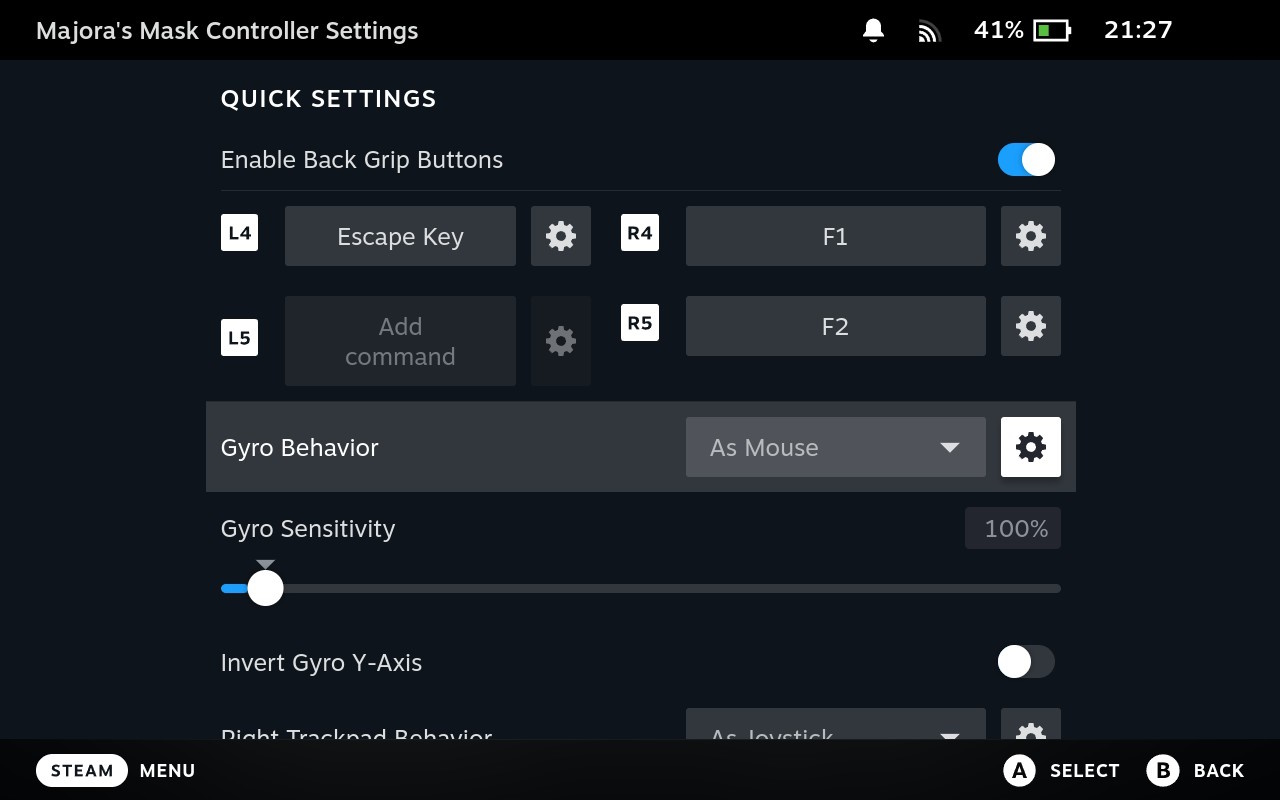
You'll probably also want to change the default behavior so that you don't need to be touching the right stick to allow gyro input. To do so, click on the Gear icon to the right of "Gyro Behavior" and ensure that "Gyro Activation Buttons" is set to "None Selected (Gyro Always On)." If this isn't the case, then select that option and then press "Select None" in the following menu.
Where is the savefile stored?
- Windows:
%LOCALAPPDATA%\Zelda64Recompiled\saves - Linux:
~/.config/Zelda64Recompiled/saves - macOS:
~/Library/Application Support/Zelda64Recompiled/saves
How do I choose a different ROM?
You don't. This project is only a port of Majora's Mask (and Ocarina of Time in the future), and it will only accept one specific ROM: the US version of the N64 release of Majora's Mask. ROMs in formats other than .z64 will be automatically converted, as long as it is the correct ROM. It is not an emulator and it cannot run any arbitrary ROM.
Instead, you can change the game by installing mods. See the mod support section for details.
Does this project have a randomizer?
Yes, there is a randomizer available as a mod for this project which can be found at github.com/RecompRando/MMRecompRando/releases/latest. Simply download MMRecompRando.zip from the releases and install it like any other mod.
Can you run this project as a portable application?
Yes, if you place a file named portable.txt in the same folder as the executable then this project will run in portable mode. In portable mode, the save files, config files, and mods are placed in the same folder as the executable.
Known Issues
- Overlays such as MSI Afterburner and other software such as Wallpaper Engine can cause performance issues with this project that prevent the game from rendering correctly. Disabling such software is recommended.
Building
Building is not required to play this project, as prebuilt binaries (which do not contain game assets) can be found in the Releases section. Instructions on how to build this project can be found in the BUILDING.md file.
Libraries Used, Projects Referenced and Special Thanks
- RT64 for the project's rendering engine
- RmlUi for building the menus and launcher
- lunasvg for SVG rendering, used by RmlUi
- FreeType for font rendering, used by RmlUi
- moodycamel::ConcurrentQueue for semaphores and fast, lock-free MPMC queues
- Gamepad Motion Helpers for sensor fusion and calibration algorithms to implement gyro aiming
- Majora's Mask Decompilation for headers and some function definitions, used for making patches or some enhancements
- Ares emulator for RSP vector instruction reference implementations, used in RSP recompilation
Special thanks to Blaze for their support of this project. They provide high-performance Linux (AMD64 & ARM64) and Apple Silicon macOS runners for GitHub Actions, greatly reducing our automated build times.
From the project's repository, fetched . Images load from GitHub.
Releases
Feed-
Release notes
1.2.2 Changelog:
- Hotfix for an issue that caused bad frame pacing on some multi-monitor setups.
Wondering about your save data when upgrading? Don't worry! Your save data is stored separately to the game itself. You can overwrite your old version and your save data will still be there, completely intact, and will work on the new version.
-
v1.2.1 3.7k
Release notes
1.2.1 Changelog:
- New features for mod developers:
- Added optional dependency functionality, which allows mods to run different code based on the presence of another mod. See this section of the template mod toml and this header for more details.
- Added exports to get the return value of a function from within a return hook. See this header for more details.
- Hooks and callbacks are now run in an order determined by the order of mods in the mod menu. Regular hooks and callbacks are run from top to bottom, while return hooks are run in the reverse of that order. Reordering mods after starting the game does not affect this ordering.
- Added configuration for texture packs to control half pixel shift behavior on a per-texture basis. See this part of the RT64 readme for more details.
- Added before/after events for autosaves (github.com/Zelda64Recomp/Zelda64Recomp/pull/611).
- Fixed recomputil memory slotmaps.
- Fixed an crash when registering an actor extension for the player actor before any other extensions were registered.
- Added the
--show-consolecommand line option to launch with a console open on Windows (github.com/Zelda64Recomp/Zelda64Recomp/pull/632). - Added support for a few new controllers.
- Improved the appearance of several effects at high framerates, including sword trails, deku spin trails, zora boomerang trails, and the particle effects spawned by Keaton grass.
- Improved the appearance of the Gibdo Mask cutscene at high framerates (github.com/Zelda64Recomp/Zelda64Recomp/pull/641).
- Prevented autosaving during certain minigames, which fixes a bug where certain game state could be retained when loading an autosave (github.com/Zelda64Recomp/Zelda64Recomp/pull/640).
- Significantly improved frame pacing when using the "Manual" framerate option.
- Fixed an issue where installing mods by dragging them onto the main menu could result in a crash or mods being disabled until the next restart.
- Fixed a memory leak that occurred when the program was minimized.
- Improved consistency of input latency.
- Allowed building without X11 headers (github.com/Zelda64Recomp/Zelda64Recomp/pull/633).
Wondering about your save data when upgrading? Don't worry! Your save data is stored separately to the game itself. You can overwrite your old version and your save data will still be there, completely intact, and will work on the new version.
- New features for mod developers:
-
v1.2.0 48k
Release notes
Wondering about your save data when upgrading? Don't worry! Your save data is stored separately to the game itself. You can overwrite your old version and your save data will still be there, completely intact, and will work on the new version.
- Modding support has been added. Mods can be installed by dragging them onto the game window or by using the "Install Mods" button in the mod menu before starting the game. You can find many mods on the Thunderstore page at thunderstore.io/c/zelda-64-recompiled/. More info can be found in the readme.
- Texture pack support has been added. Texture packs are managed with the same menu as mods and installed in the same way. Some texture packs can be found on the thunderstore page linked previously.
- MacOS is now supported via a Metal renderer. Thanks @dcvz and @tanmaysachan!
- Many graphical optimizations have been added to improve performance on lower end GPUs.
- Various UI tweaks and improvements.
- A flatpak has been added for the Linux version. Please note that the AppImage has been removed due to some file picker issues it had.
-
v1.1.1 83k
Release notes
Wondering about your save data when upgrading? Don't worry! Your save data is stored separately to the game itself. You can overwrite your old version and your save data will still be there, completely intact, and will work on the new version.
NOTE: There are known rendering issues with AMD RDNA3 integrated GPUs on Windows (e.g. Ryzen Z1 or Radeon 780M). Use the workaround in github.com/Zelda64Recomp/Zelda64Recomp/issues/289 or wait for AMD to fix it in a driver update.
- The ocarina now accepts DPad inputs (#311)
- Analog camera improvements:
- When aiming inside of a deku flower, Link will follow the camera (#306)
- When rolling as Goron, the camera will automatically switch to auto mode when the spikes come out (you can touch the right stick again to make the camera free again) (#306)
- The Wart boss fight will now start if you look at the boss with the analog camera (#308)
- Added a workaround for an AMD driver bug affecting the usage of a 64 bit framebuffer on RDNA3 GPUs on DX12. These GPUs will default to Vulkan until AMD fixes their issue. (#314)
- Added an automatic file backup system for the config files to prevent file corruption (#335)
- Shield aiming (holding R) will respect the aiming camera axis inversion setting. (#338)
-
v1.1.0 21k
Release notes
Wondering about your save data when upgrading? Don't worry! Your save data is stored separately to the game itself. You can overwrite your old version and your save data will still be there, completely intact, and will work on the new version. :)
NOTE: This update is known to cause rendering issues with AMD RDNA3 GPUs on Windows (e.g. RX 7000 series and Ryzen Z1). Use the workaround mentioned here or wait for AMD to fix it in a driver update.
- Added an analog "free" camera in the style of later entries in the series. Moving the right stick will allow you to freely rotate the camera, and pressing the Target button or going through an entrance will switch back to the normal camera.
- Improved motion blur effect at high framerates by using a high precision internal framebuffer (won't be enabled on machines with less than 1GB of VRAM).
- Implemented N64 noise dither (affects the motion blur scenes).
- Extended Dawn of the X Day screen to account for faster load times to match console timings.
- Added a configurable scaled deadzone option to the menu. (#257)
- Added the option to remap the menu button on controllers. (#181)
- Added an automatic save backup system to reduce chance of losing data if saving gets interrupted. (#260)
- Fixed a Linux crash on startup by forcing SDL2 video driver selection to X11. (#197)
- Fixed the Skull Kid "curse" effect in very wide aspect ratios. (#259)
- Added a main volume slider. (#267)
-
v1.0.1 29k
Release notes
- Fixed a bug with autosaving where progress made in the dungeon or area you were currently in would only partially be saved (duplicate stray fairies and opened chests).
- Added error messages when RT64 encounters an issue on startup.
-
v1.0.0 71k
Release notes
Initial Release
Works for me
Did it work on your PC? A quick report tells other players which versions are safe to try.
Discussion
No posts yet. Ask a question, share your setup or post a clip.
Sign in to post