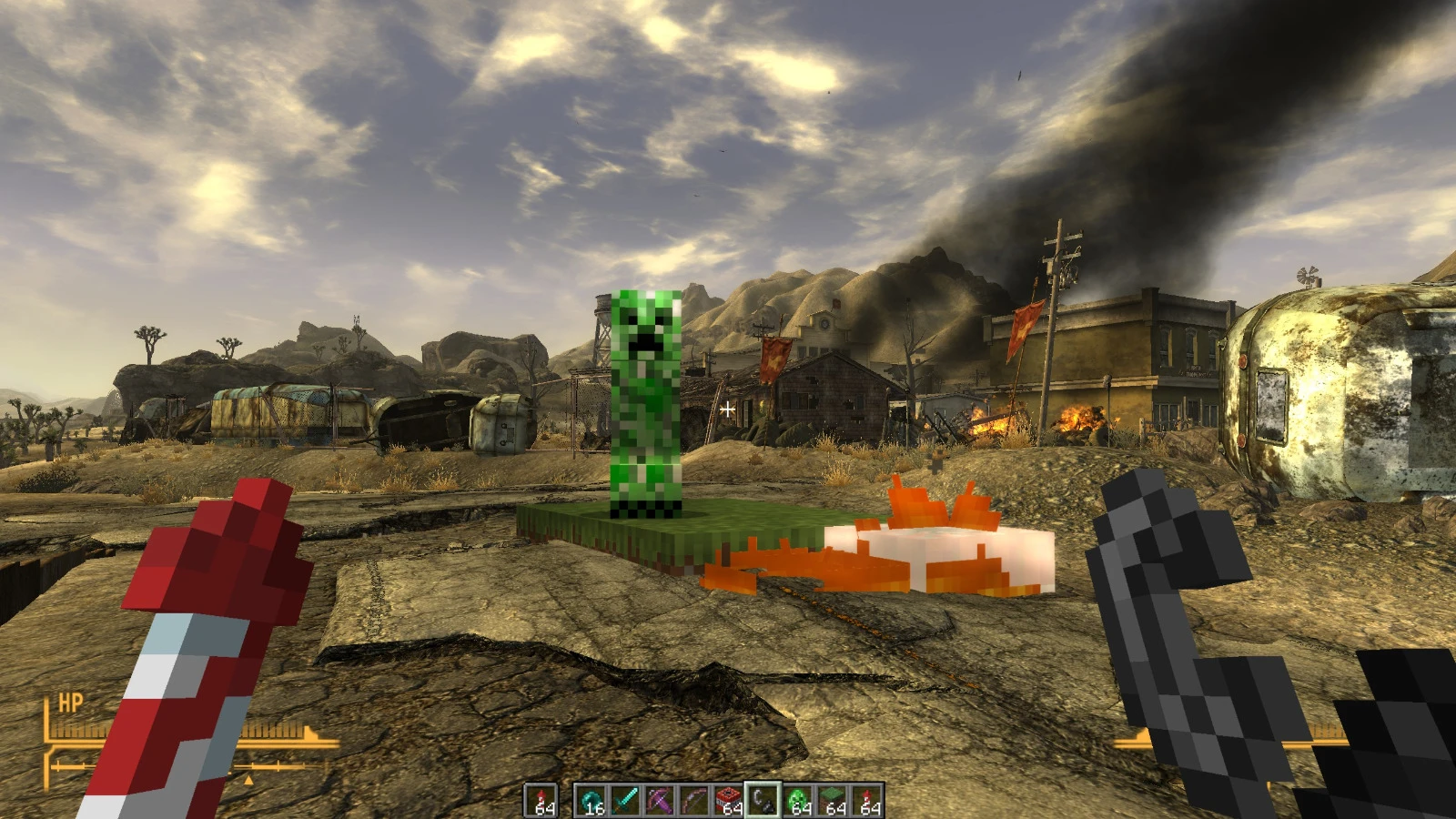
New VegasCraft
Minecraft Java inside Fallout: New Vegas. FNV's camera drives Minecraft's, FNV's ground becomes Minecraft collision, and Minecraft's picture is composited into…

Run Minecraft 1.20.1 with Cracker's Wither Storm Mod alongside GTA V Legacy and bring the storm into Los Santos: it grabs and consumes GTA NPCs and cars.
Run Minecraft Java 1.20.1 with Cracker's Wither Storm Mod alongside GTA V Legacy, and bring the actual Minecraft storm into Los Santos. See the README below for details.
Run Minecraft Java 1.20.1 with Cracker's Wither Storm Mod alongside GTA V Legacy, and bring the actual Minecraft storm into Los Santos. Minecraft renders and simulates the storm; the bridge draws it into GTA's view and makes GTA's people and vehicles react to what it does.
This is a modified build of Rehan's Minecraft–GTA V passthrough example, from universal-modder. This adaptation adds Forge 1.20.1, Cracker's Wither Storm Mod integration, and GTA NPC/vehicle interaction with the storm. The original Fabric code is also included in mc/.
GTA buildings, roads, and terrain remain intact. Minecraft ground proxies can become flying rubble and trigger dust and forces in GTA. This build does not create street spots, persistent craters, terrain cutaways, or remove building models.
| Component | Version / requirement |
|---|---|
| OS | Windows; both games run on the same computer |
| GTA | GTA V Legacy, Story Mode (GTA5.exe) |
| Minecraft | Java Edition 1.20.1, in a dedicated launcher instance |
| Forge | 47.4.10, matching the current build configuration |
| Wither Storm | 4.2.1 for Minecraft 1.20.1: witherstormmod-1.20.1-4.2.1-all.jar |
| Java | JDK 17 for the Forge build and launcher instance |
| GTA scripting | ScriptHookV and its ASI loader, compatible with your installed GTA build |
| Compositor | ReShade 6.8.0 with full add-on support |
| C++ build | x64 Native Tools Command Prompt for Visual Studio 2022 / Build Tools with Desktop development with C++, MSVC x64, and Windows SDK |
| Dependency/install scripts | WSL with Bash, curl, and unzip; rsync if using a separate Windows build mirror |
Use Story Mode with BattlEye disabled. ScriptHookV does not support GTA Online. GTA V Enhanced is not the target of this build.
Download Cracker's Wither Storm Mod separately. Game files, the storm mod, ScriptHookV, and ReShade downloads are not included in this repository.
git clone https://github.com/VortexisTV/wither-storm-gta5-passthrough.gitKeep the checkout on a Windows drive, such as C:\Projects\wither-storm-gta-passthrough, so Windows Java and MSVC can build it. The commands below run from the repository root unless stated otherwise.
Set JAVA_HOME to your JDK 17 directory.
C:\Program Files\Java\jdk-17). C:\Program Files\Java\jdk-17.Create mc-forge/libs/ and put the downloaded storm mod JAR there, then run in PowerShell:
cd mc-forge
.\gradlew.bat build
cd ..
The result is mc-forge/build/libs/passthrough-forge-0.1.0.jar. The storm mod is a compile-time dependency and is not bundled into this JAR.
To use a storm JAR already installed elsewhere, override its directory:
cd mc-forge
.\gradlew.bat build "-Pwitherstorm_dir=D:/Minecraft/StormInstance/mods"
cd ..
Create a dedicated Minecraft 1.20.1 instance with Forge 47.4.10. Put both the bridge JAR and the storm mod JAR in that instance's mods folder. Use Java 17 for that instance. A dedicated instance matters because the bridge creates/opens a creative void world called passthrough and adjusts Minecraft's graphics and focus settings.
In WSL, change to the repository on the Windows drive, then run:
bash gta/fetch_deps.shThis fetches the ScriptHookV SDK, ReShade headers, shader includes, and runtime files into the ignored gta/third_party/ folder. If a download is unavailable, obtain the matching files from the official sites; see GTA build details.
In PowerShell:
.\gta\build.batThe result is gta/build/MCPassthrough.asi. It contains both the ScriptHookV script and the ReShade add-on.
Close GTA before installing. For a complete first installation, run from WSL, replacing the example with your own game directory:
GTA_DIR="/mnt/d/Games/Grand Theft Auto V" bash gta/install.shThe installer adds the ASI loader, ScriptHookV, the bridge, and ReShade loaded as ReShade64.asi, plus the shader and configuration. It checks for conflicting loader, ReShade, and launch-argument files before replacing them. Review the target directory and any existing mod setup first.
For later updates to an installation that already has ScriptHookV, the ASI loader, and ReShade configured:
.\gta\install.ps1 -Gta "D:\Games\Grand Theft Auto V"This PowerShell helper updates only MCPassthrough.asi and MCPassthrough.fx and keeps a backup. It also accepts -Restore with a backup directory.
passthrough world.127.0.0.1:25599 and composites its view into GTA.The player stays in creative mode. GTA movement and camera control drive the Minecraft player and camera.
| Key | Action |
|---|---|
| F7 | Toggle the passthrough |
| F8 | Re-level Minecraft's ground at the player's position |
| F9 | Summon a Wither Storm ahead of the player |
| Shift+F9 | Summon a grown storm at phase 4 |
| F10 | Advance the storm one phase |
| F11 | Remove the storm |
| Shift+F11 | Start its death sequence |
| Left / right mouse | Minecraft attack / use |
| Mouse wheel / 1–9 | Minecraft hotbar selection |
| Tab | Cycle experimental GTA gun modes, then return to Minecraft input |
| Folder | Contents |
|---|---|
mc-forge/ | Forge 1.20.1 bridge, storm integration, mixins, Gradle wrapper, and test helper |
gta/ | C++ ScriptHookV plugin, ReShade compositor/effect, build/install scripts, and offline harnesses |
mc/ | Original Fabric 26.3 implementation, retained for reference and separate builds |
mc-forge/docs/ | Minecraft-side development screenshots |
THIRD_PARTY_NOTICES.md | Upstream attribution and external dependency information |
GTA sends camera, player, input, and sampled ground data to Minecraft over a local WebSocket. Minecraft exports world color, world depth, and a separate HUD/hand layer through the Windows shared-memory mapping Local\MCPassthroughFrame. The ReShade add-on uploads these frames, and MCPassthrough.fx combines them with GTA's view.
The Forge storm bridge reports tractor beams, grabbed entities, consumption, and torn ground. GTA applies the corresponding movement, removals, forces, explosions, and weather. One GTA meter corresponds to one Minecraft block.
The Forge adaptation has been used in GTA V Legacy with the storm visibly present and grabbing NPCs and vehicles. This is an experimental integration; rendering, performance, and native behavior depend on the game build and installed mods.
The original passthrough implementation is by Rehan and the universal-modder contributors. This repository adapts their example to Forge 1.20.1 and adds the Wither Storm bridge.
Cracker's Wither Storm Mod is by nonamecrackers2; its simulation and assets come from the separately installed mod. ScriptHookV and its ASI loader by Alexander Blade. ReShade and its add-on API by crosire, with ReShade.fxh from crosire/reshade-shaders.
The project also uses Forge, Mixin, Fabric in the original implementation, and native names/hashes from alloc8or's NativeDB.
The passthrough source is distributed under the MIT license, preserving the upstream license and copyright notice. Third-party components retain their own licenses.
Written with Claude Code + Codex. Minecraft belongs to Mojang Studios and Microsoft, and GTA V to Rockstar Games and Take-Two. This is a fan project.
From the project's repository, fetched . Images load from GitHub.
No releases yet. Follow the project to hear when the first one comes out.
Did it work on your PC? A quick report tells other players which versions are safe to try.
Built on Minecraft × GTA V (universal-modder example).
Minecraft Java inside Fallout: New Vegas. FNV's camera drives Minecraft's, FNV's ground becomes Minecraft collision, and Minecraft's picture is composited into…
Play Minecraft inside GTA IV, with block placement, combat and inventory. Builds on the universal-modder passthrough work.
No posts yet. Ask a question, share your setup or post a clip.
Sign in to post