Lost Odyssey Recomp
Experimental native PC port of Lost Odyssey using static recompilation. No game assets included.
Experimental native PC port of Lost Odyssey using static recompilation. No game assets included. See the README below for details.
README
On GitHub
Lost Odyssey Recomp
An experimental native PC port of Lost Odyssey for Xbox 360.
Windows x64 · Linux x64 · macOS arm64 (experimental) · Direct3D 12 · Vulkan · Metal
Download · Installation guide · 简体中文
Features · Controls · Debug Menu
Changelog · Report an issue · Project board · Build from source
Start playing
Choose a package from the latest release. The current published version is v0.8.0.
| Platform | Package | First launch |
|---|---|---|
| Windows x64 | LostOdysseyRecomp-windows-x64-v0.8.0.zip | Extract the complete ZIP to a writable folder, then run LostOdysseyRecomp.exe. Requires an AVX-capable CPU; Direct3D 12 is the default backend, with Vulkan available. |
| Linux x64 | LostOdysseyRecomp-linux-x64-v0.8.0.AppImage | Make the file executable with chmod +x, then run it. Uses Vulkan. |
| Linux x64 | LostOdysseyRecomp-linux-x64-v0.8.0.flatpak | Install the Freedesktop 26.08 runtime, then the downloaded bundle. See the Flatpak commands. Uses Vulkan. |
| macOS arm64 (experimental) | LostOdysseyRecomp-macos-arm64-v0.8.0.dmg | Open the disk image and drag LostOdysseyRecomp.app to the Applications link. The app is not notarized, so macOS blocks the first launch: try to open it, then open System Settings → Privacy & Security and choose Open Anyway. Requires an Apple Silicon Mac with macOS 15 or later; the game has only run on macOS 26.6.2. Uses Metal. See the macOS steps. |
- Import your game data. The built-in importer opens when no usable game installation is found. Use Files or Folder to select an extracted game folder,
default.xex, an XDVDFS ISO or GOD data. - Choose the interface language, game language and graphics options. The game starts after setup and shader preparation. If no precompiled shaders for the selected renderer are installed, it first offers to download them; skipping compiles them on your PC. Later launches reuse the shader cache.
- Add the remaining discs and DLC when needed. Open Gameplay → Import discs & DLC in Settings. With all four matching discs imported, the game selects the requested disc automatically.
Disc 1 is required to start. Use one of the audited Asian multilingual or USA/Europe four-disc sets; do not mix editions. The installation guide covers disc identification, Linux setup, file locations and updates. Release packages need neither Python nor Visual Studio. Keep your saves and profiles when updating.
macOS Apple Silicon (experimental)
v0.7.35 was the first release with a macOS package and v0.8.0 is the second: an experimental arm64 path that renders with Metal. Open LostOdysseyRecomp-macos-arm64-v0.8.0.dmg, drag LostOdysseyRecomp.app to the Applications link and start it. The app requires an Apple Silicon Mac with macOS 15 or later (the game has only run on macOS 26). It is ad-hoc signed and not notarized, and it stays that way: the maintainer decided on 2026-10-03 not to do Developer ID signing or notarization. macOS therefore blocks the first launch. Try to open the app once, then open System Settings → Privacy & Security, choose Open Anyway for it and confirm; or run xattr -dr com.apple.quarantine /Applications/LostOdysseyRecomp.app. The installation guide has the steps and file locations. The game's update check only offers to open the release page, so you replace the app yourself. Validation so far is one Mac: on the maintainer's M1 Max (macOS 26.6.2) the opening new-game battle ran with Metal, and with v0.7.35 the Metal shader pack was downloaded and used; a source build with GTAO and 4× shadows also ran the opening battle there. Long play, broader scenes, other Macs, image quality and performance have not been tested. To build it yourself, use the macOS build instructions.
Experimental HDR
v0.8.0 includes experimental HDR output paths for Windows D3D12/Vulkan, Linux Vulkan and macOS Metal. Enable HDR in Graphics, save and restart. HDR peak brightness opens a frozen frame of the current game scene: the left view is an SDR brightness preview clipped at reference white, while the right view uses normal HDR tone mapping and updates the peak live. Switch between the Scene and Test pattern with the mouse or controller X button; if no valid scene is available, the standard pattern is used. Auto follows the active display's reported peak when available; if none is available, it uses a 1000-nit content reference. The current Linux Vulkan path has no display-peak report, so Auto uses that fallback. On macOS, Auto derives a relative EDR headroom estimate, not a measured panel brightness. Peak adjustments preview on the calibration page; peak and paper-white changes apply after saving without a restart. Since v0.8.0, HDR works together with every anti-aliasing mode (FXAA, SMAA and TAA run on the HDR scene) and every upscaler (DLSS, FSR and MetalFX upscale the SDR scene, and the HDR frame is rebuilt from the upscaled frame plus the game's pre-upscale highlights). DLSS frame generation on Vulkan keeps HDR (checked on an RTX 5080 through the SDR preview only, not on an HDR panel; LO_HDR_FG=0 keeps an SDR swap chain instead). Other frame generation paths (FSR on Vulkan, and everything on Direct3D 12 and Metal) keep an SDR swap chain. Unsupported surface format/color-space pairs fall back to SDR. The maintainer confirmed on-device HDR validation on 2026-10-02; exact platform, backend and display coverage was not recorded, so this does not establish cross-platform coverage. In the v0.7.35 run on a Mac whose external display had no EDR headroom, HDR requested in the game stayed in SDR, and Metal HDR output itself had not been seen. See the HDR technical note for output semantics and validation limits.
Android ARM64 runtime (experimental, build from source)
The branch now includes an experimental arm64 Android runtime target alongside the diagnostic APK. The runtime uses an SDL Android activity, app-owned external storage, the Android ARM64 FFmpeg configuration and an Android DXC build. It is a development build, not a published or generally supported Android release. Android is not part of v0.8.0: the source is on main, but the port is deferred out of this release because of an upstream Qualcomm bug, and no APK is published. See the Android build instructions and the Android port research note for the pinned toolchain and current validation limits.
The Android runtime now loads the development resources, plays the opening video and reaches the first battle on the test tablet. Touch input passed title/menu navigation and two opening-battle attacks with visible damage; one initial-battle shader preparation observed a pause of about 40 seconds. Longer play, audio beyond native queue evidence, other GPUs, 16 KB devices and physical-controller validation remain pending. See the Android port research note and Android DXC build note.
The runtime keeps SDL physical-controller support and adds an Android on-screen touch controller. Its source implementation now supports the Controller settings size/opacity controls and an Edit layout screen for dragging, saving, resetting and showing or hiding individual controls; the layout model checks and device UI flow are verified on the development tablet. This source path has not yet been accepted through a complete game session. The generated PPC code also remains available as a separate Android ARM64/PIC static-library target.
Connecting a USB or Bluetooth controller automatically hides the touch controls while keeping CTRL available. Enable Show touch controls to use both together; disconnecting the last controller restores the saved touch preference. Android also hides unavailable desktop graphics options and rebuilds its Vulkan surface when returning from the background. Its Vulkan shaders can be prebuilt on a host with the Android-specific shader contract; desktop Vulkan bundles are incompatible. See the Android instructions for generation and installation.
Latest changes
v0.8.0 is the second release with a macOS package. HDR output now works together with every anti-aliasing mode and every upscaler, and with DLSS frame generation on Vulkan; other frame generation paths keep an SDR swap chain. The DLSS frame generation run was on an RTX 5080 and checked through the SDR preview only, not on an HDR panel. Shadow resolution (1×/2×/4×) and experimental ambient occlusion (SSAO/GTAO) are now in the release; broader visual quality and performance remain unverified. Vulkan and Metal now read one shader pack, portable_vk.lospv, and DirectX 12 keeps portable_dx12.lospd; the new shader contract needs the new packs, so the first start after updating offers the download. The macOS app now requires macOS 15 or later (the game has only run on macOS 26) and stays ad-hoc signed and not notarized. The sun flashing through terrain (#118) has a second fix (PR #149): in a 23-second sail at the #118 cliff on an AMD Radeon 8060S (Direct3D 12 through Proton), v0.7.35 flashed the sun three times and the fix never did. A broken OptiScaler.dll no longer shows a Windows error dialog, more Settings texts are translated into Japanese, Korean and Simplified Chinese, and the Mod tools can read the asset-inventory catalog. SDL2 is updated with a HIDAPI driver for 8BitDo controllers (#97, contributed by Xarishark; no controller was tested). An experimental Linux AArch64 source and cross-build path is added (#60, contributed by dj5927); no ARM64 package is published. Android is not included in this release: its source is on main, but the port is deferred because of an upstream Qualcomm bug, and no APK is published. See the changelog for the full list and earlier releases and the development status for validation coverage.
Current features
| Feature | Available controls and behavior |
|---|---|
| Import and setup | Folder, XEX, ISO and GOD sources; supported DLC; selective disc replacement; language and graphics setup before the first game launch. Original source files remain untouched. |
| Languages | English, Japanese, Korean, Traditional Chinese and Simplified Chinese interface options. Game languages depend on the installed edition. |
| Display and image quality | 16:9 and 21:9 resolution presets, a Widescreen toggle, Off/FXAA/SMAA/experimental TAA, DLSS or FSR 3.1 upscaling, filtering and RGB Range options. Since v0.7.35, screens taller than 16:9 (such as 16:10, 3:2 and 4:3) are filled with the 3D scene, menus and movies keep a 16:9 layout, the minimap moves toward the top on taller screens, and menus on ultrawide screens get side bars (technical note). Experimental HDR is also available for Windows D3D12/Vulkan, Linux Vulkan and macOS Metal, with automatic or manual peak calibration; see the HDR technical note. Linux HDR hardware validation is pending. On Linux, DLSS was reported unavailable on an NVIDIA GPU with the v0.7.25 packages (#116); v0.7.35 contains the fix, which has not yet run on an NVIDIA GPU under Linux. |
| Shadows and ambient occlusion | Shadow resolution 1×/2×/4× (default 1×) and experimental AO Off/SSAO/GTAO (default Off) are saved as shadow_resolution and ambient_occlusion in settings.ini. AO is a screen-space effect; its scene coverage, image quality and performance still need evaluation. See the technical note. |
| Frame rate | 30/60/90/120 FPS targets and FreeSync / G-SYNC Compatible VRR controls. Actual performance depends on the scene and hardware. |
| Frame generation | Windows D3D12 offers Off/DLSS/FSR, supported DLSS multipliers and fixed 2× FSR. Save applies supported changes; switching from DLSS FG to FSR FG requires a restart. Since v0.7.35, Windows Vulkan also offers Off/DLSS with fixed 2×–6× (enabling it after starting with it off, or switching providers, needs a restart), plus experimental Vulkan FSR 2× (source builds only) and experimental macOS MetalFX 2× (not run on Mac hardware); see the technical note. |
| Settings | Original game fonts, scrollable lists, and Save/apply controls. On the Graphics page, Start/Enter moves focus to Save; confirm that item to save. Options that require a restart offer Now/Later. |
| Shader preparation | Parallel compilation, a skip option and cache reuse. The v0.7.25 packages bundled a Vulkan pack that did not match their runtime, so their first launch compiled every shader (about 3 minutes on a 16-thread CPU). The v0.7.35 packages carry no shader pack: when none matching the selected renderer is installed, the game offers to download it at startup, and skipping compiles the shaders on your PC instead. Since v0.8.0, Vulkan (Windows, Linux) and Metal (macOS) read one pack, portable_vk.lospv, and DirectX 12 keeps portable_dx12.lospd; the new shader contract needs the new packs, so the first start after updating offers the download (details). |
| Mods | Mod API v1, LOTEX1/PNG tools, native-menu atlas and font-page replacements, and PlayStation button prompts. See the modding guide for supported replacements and installation, and the asset inventory for the read-only resource catalog. |
| Input and tools | SDL-mapped controllers, keyboard input and rumble; an English/Simplified Chinese Debug Menu for captures, same-map teleport, speed controls and game-data editing. |
Fullscreen, mixed-DPI displays, broader upscaler coverage, Linux hardware, the tall/ultrawide layout across more hardware, and later-disc progression still need more testing. Current work is tracked in the roadmap and Project board.
Controls
SDL-mapped controllers and the keyboard can be used together for player 1. Unmapped joysticks need an SDL controller mapping; see the input reference.
| Game action | Keyboard |
|---|---|
| Start / Back | Enter / Backspace |
| A / B / X / Y | Z / X / A / S |
| D-pad / left stick | Arrow keys / I, J, K, L |
| Left / right shoulder | Q / W |
| Left / right trigger | E / R |
| Debug Menu | F1 |
For Ring actions, use the controller's right trigger or R. Rumble is enabled by default; set LO_CONTROLLER_RUMBLE=0 to disable it.
Debug menu
Press F1, or LB+RB on a controller (L1+R1 on PlayStation layouts), to open or close the Debug Menu. The game pauses while it is open. It has three pages: Overview, Teleport and Cheats. This overlay is separate from the normal Settings menu and uses keyboard or controller input, not the mouse.
| Action | Keyboard | Controller |
|---|---|---|
| Select a row | ↑ / ↓ | D-pad up / down |
| Change a value | ← / → | D-pad left / right |
| Confirm | Enter | A |
| Return or close | Esc | B |
| Previous / next page | Q or Tab / E | LB / RB |
| Change Cheats category | Select the category row, then ← / → | LT / RT |
| Open or close the overlay | F1 | LB+RB |
Overview: captures and game actions
Overview shows the current map name and ID. It also contains the menu language, Capture render state, Save Anywhere, and actions to request a win for the current battle or cancel a pending win request.
To record a rendering problem, select Capture render state, confirm, then close the menu so rendering can continue. The capture collects three frames and creates an archive in captures/ in the background. The status message gives its absolute path: .zip on Windows or .tar.gz on Linux. If archiving fails, the original capture directory remains available. Captures include screenshots, rendering data, shaders and logs; review the contents before sharing.
Save Anywhere enables the original game's System → Save action. Close the Debug Menu and reopen the game's System menu to use it. It does not create a separate quicksave.
Teleport: positions within the current map
The Teleport page provides a position bookmark, editable X/Y/Z coordinates and step size, and the current map's available points of interest. On the coordinate row, press Enter to select X, Y or Z, then use ←/→ to adjust that axis by the selected step. Confirm the teleport action or a point of interest, then close the menu to move. A scene change clears the bookmark and cancels a pending teleport.
Cheats: speed and game-data tools
The Cheats page groups its tools into six categories:
| Category | What it does |
|---|---|
| Quick tools | Fast-forward mode and multiplier, Allow memory edits, gold and HP/MP actions. |
| Characters | Character HP/MP, EXP values from 0–99, and skills. The EXP field is not a level selector. |
| Inventory | Item and material quantities of 1, 10, 50 or 99, plus fill actions for known categories. Use the game's inventory sort to refresh the display when needed. |
| Equipment | Experimental weapon, ring and existing accessory-slot changes. |
| Party | Experimental five-slot party composition, front/back row and field-character controls. Some changes may need a reload to appear. |
| Developer | Experimental access to the original EDIT MENU. Enable it, close F1, then press LT+RT. Turn the option off after leaving the editor. |
Fast-forward works independently of memory editing and currently requires a controller. Choose Hold to accelerate while holding LT, or Toggle to switch acceleration on and off with each LT press. Select a multiplier of 2×, 3×, 4×, 6× or 8×, then close the overlay to use it. Acceleration stops while a menu is open, the window is unfocused or the scene editor is active; LT+RT does not accelerate. Audio is not time-stretched.
Memory editing is off by default. To change game data, first back up your save and enter a controllable scene outside battle. Enable Allow memory edits, choose an action, then confirm Yes. When the status shows a pending change, close F1 to let the action run. Reopen the menu to check the result. A scene change cancels a pending edit.
The menu language and Save Anywhere option are written to settings.ini. Fast-forward settings and memory-edit permission reset when the program restarts. Changes to game values can become part of a normal game save.
Files and folders
The Windows ZIP is portable: everything stays in the folder you extracted it to. A Linux build whose own folder is writable, such as a source build or an extracted AppImage, is portable too. The AppImage, the Flatpak and a macOS .app cannot write next to the program, so they keep your files in per-user folders.
| Package | Config folder | Data folder | Log folder |
|---|---|---|---|
| Windows ZIP | folder with LostOdysseyRecomp.exe | same | same |
| Linux, writable program folder | program folder | same | same |
| Linux AppImage | ~/.config/lost-odyssey-recomp/ | ~/.local/share/lost-odyssey-recomp/ | ~/.local/state/lost-odyssey-recomp/ |
| Linux Flatpak | ~/.var/app/io.github.freefrank.LostOdysseyRecomp/config/lost-odyssey-recomp/ | ~/.var/app/io.github.freefrank.LostOdysseyRecomp/data/ (/var/data inside the sandbox) | ~/.var/app/io.github.freefrank.LostOdysseyRecomp/.local/state/lost-odyssey-recomp/ |
macOS .app (experimental) | ~/Library/Application Support/LostOdysseyRecomp/ | same | ~/Library/Logs/LostOdysseyRecomp/ |
On Linux, set XDG_CONFIG_HOME, XDG_DATA_HOME or XDG_STATE_HOME to move the AppImage folders.
| Content | Location | Notes |
|---|---|---|
| Imported game data | data folder: game/ with disc1/–disc4/ and dlc/ | The importer's default destination. You can import elsewhere. |
| Chosen game folder | game-path.txt: beside the program when portable, otherwise in the config folder | Written by the importer. |
| Settings | config folder: settings.ini and taa-collection.ini | Without settings.ini, the first-launch setup runs. |
| Saves | data folder: save/ | Keep when updating. |
| Profiles | data folder: profile/ | Keep when updating. LO_PROFILE_DIR overrides it. |
| Shader and pipeline cache | data folder: cache/shaders/ | Rebuilt if deleted. LO_SHADER_CACHE_DIR overrides it. |
| Logs | log folder: logs/runtime-*.log and logs/shader-*.jsonl | The current run and the two previous runs are kept. |
| F1 render captures | config folder: captures/ | .zip on Windows, .tar.gz on Linux and macOS. |
| Mods | mods/: beside the program when portable, otherwise in the data folder | LO_MODS_DIR overrides it. |
| Shader packs | install folder: shaders/ beside the program when portable, otherwise shaders/ in the data folder | The game downloads the pack for the selected renderer here (portable_vk.lospv for Vulkan, Metal and Android, or portable_dx12.lospd); skipping the offer is remembered in declined-downloads.txt in the same folder. v0.7.25 and earlier bundled shaders/portable_vk.lospv beside the program. |
| Updater work files | Windows: .update\ beside the program. AppImage: log folder .update/ | Flatpak and macOS packages are updated manually. |
How the game is found when --game is not given:
- The program reads
game-path.txt. - If that file is absent, it looks for
default.xexin the data folder'sgame/(per-user packages only). - Then it checks
game/, the program folder and../gamenext to the program. - If nothing is found, the importer opens.
Launching with --game keeps the current working directory. In a portable layout, settings, saves, profiles, cache, logs and captures then follow the folder you start from. In per-user packages only captures/ does.
Command-line options
| Option | Effect |
|---|---|
--game | Uses this game: a folder that contains default.xex or disc1/, or the default.xex file itself. Skips game-path.txt, the search and the automatic importer, and exits with an error if no default.xex is found. |
--install | Opens the importer even when a game is already set up, then exits: 0 after a successful import, 1 if cancelled or failed. Gameplay → Import discs & DLC relaunches with this option. |
--setup | Runs the first-launch setup again, then starts the game. On Windows this is the setup dialog. Linux and macOS have no setup screen yet, so it only saves the current settings. |
--setup-only | Like --setup, then exits. |
--prepare-shaders-only | Loads the game data, prepares shaders and pipelines, then exits without starting the game: 0 on success, 1 on failure. Use it to warm the shader cache. |
--quiet-kernel | Leaves kernel trace lines out of the log. |
Options must be spelled exactly. Write --game as two arguments; --game= is ignored, along with any other unknown argument. There is no --help or --version. The updater and restart logic use internal arguments (--apply-plan, --wait-process, --restart-ready, --restart-parent-fd, --restart-ready-fd); do not pass them yourself. LostOdysseyRecomp.exe is a GUI program and prints nothing to a console; check the log instead.
LostOdysseyRecomp.exe --game "D:\Games\Lost Odyssey"
./LostOdysseyRecomp-linux-x64-v0.8.0.AppImage --game ~/Games/LostOdyssey
flatpak run io.github.freefrank.LostOdysseyRecomp --game ~/Games/LostOdyssey
LostOdysseyRecomp.app/Contents/MacOS/LostOdysseyRecomp --game ~/Games/LostOdyssey
Environment variables give more launch options. Each one overrides the saved setting for that run.
| Variable | Effect |
|---|---|
LO_GRAPHICS_API | d3d12 or vulkan on Windows. Linux always uses Vulkan and macOS always uses Metal. |
LO_FPS | Frame-rate cap from 0 to 1000; 0 means uncapped. |
LO_FG_PROVIDER, LO_FG_MODE, LO_FG_MULTIPLIER, LO_FG_TARGET_FPS | Frame generation on Windows: off/dlss/fsr; off/fixed/dynamic; 2–6; target FPS. Since v0.7.35, Vulkan accepts DLSS fixed 2–6 and, in builds with LO_ENABLE_VULKAN_FSR_FG, FSR fixed 2; macOS accepts metalfx (fixed 2, experimental). Dynamic mode is D3D12 DLSS only. Details. |
LO_OPTISCALER_PATH | Experimental Windows OptiScaler loading: absolute path to your OptiScaler.dll. Requires DLSS/NGX in the build and LO_FG_PROVIDER=off; select DLSS in-game. Setup and limits. |
LO_NO_UPDATE | Any value other than 0 skips the update check. |
LO_PROFILE_DIR, LO_SHADER_CACHE_DIR, LO_MODS_DIR | Use another profile, shader cache or mods folder. An empty LO_SHADER_CACHE_DIR disables the shader cache. |
LO_MODS | 0 or false disables mods. |
LO_LOG_FILE | Write the log to this path, or 0 for no log file. |
LO_AUDIO_MUTE, LO_CONTROLLER_RUMBLE | LO_AUDIO_MUTE=1 mutes audio; LO_CONTROLLER_RUMBLE=0 turns rumble off. |
Reporting a problem
Include the exact package or source version, operating system, graphics backend, GPU/driver, game edition and disc, and the steps or scene that reproduce the problem. Attach the complete current logs/runtime-.log; it records startup and graphics details. LO_LOG_FILE= selects another log path, and LO_LOG_FILE=0 disables the duplicate file sink.
For a visual defect, use the capture procedure while the problem is visible. Share the resulting archive only after reviewing it. Do not attach game executables, resource archives, saves or personal data.
Optional diagnostics are off by default and can be disabled in Settings. See Privacy for the data collected and sharing controls.
In-game screenshots
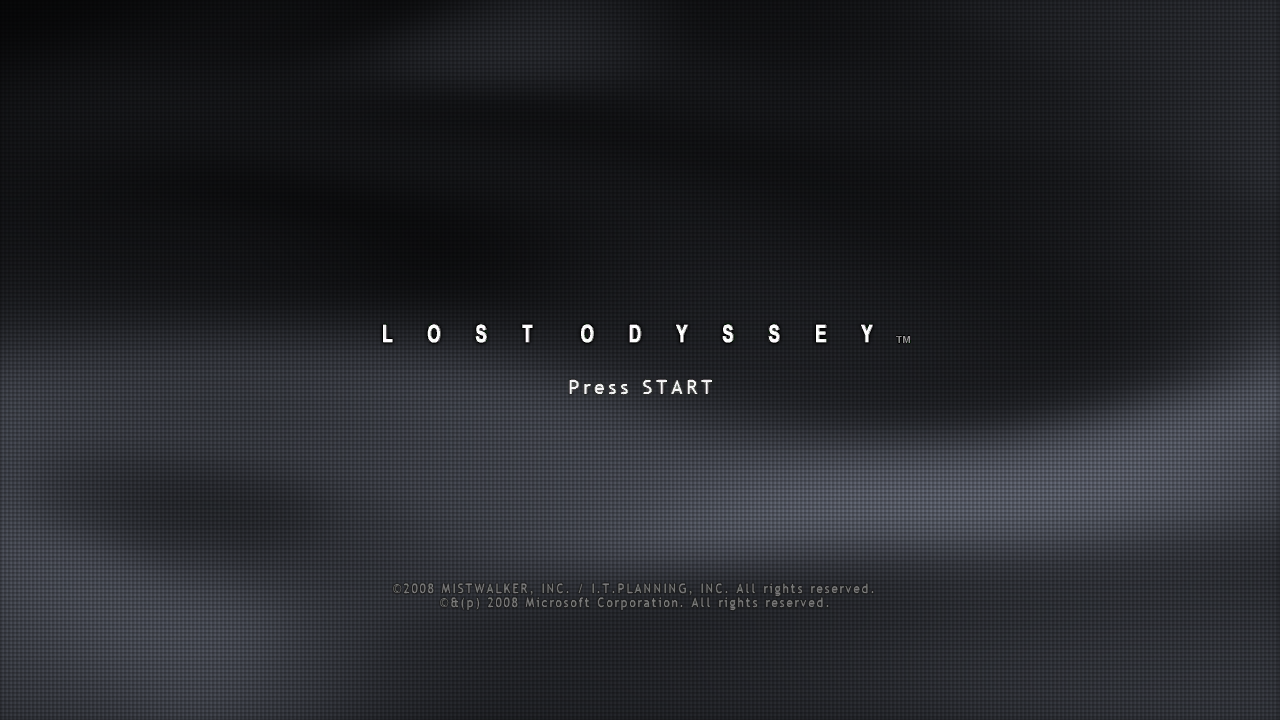
| Ring combat | City exploration |
|---|---|
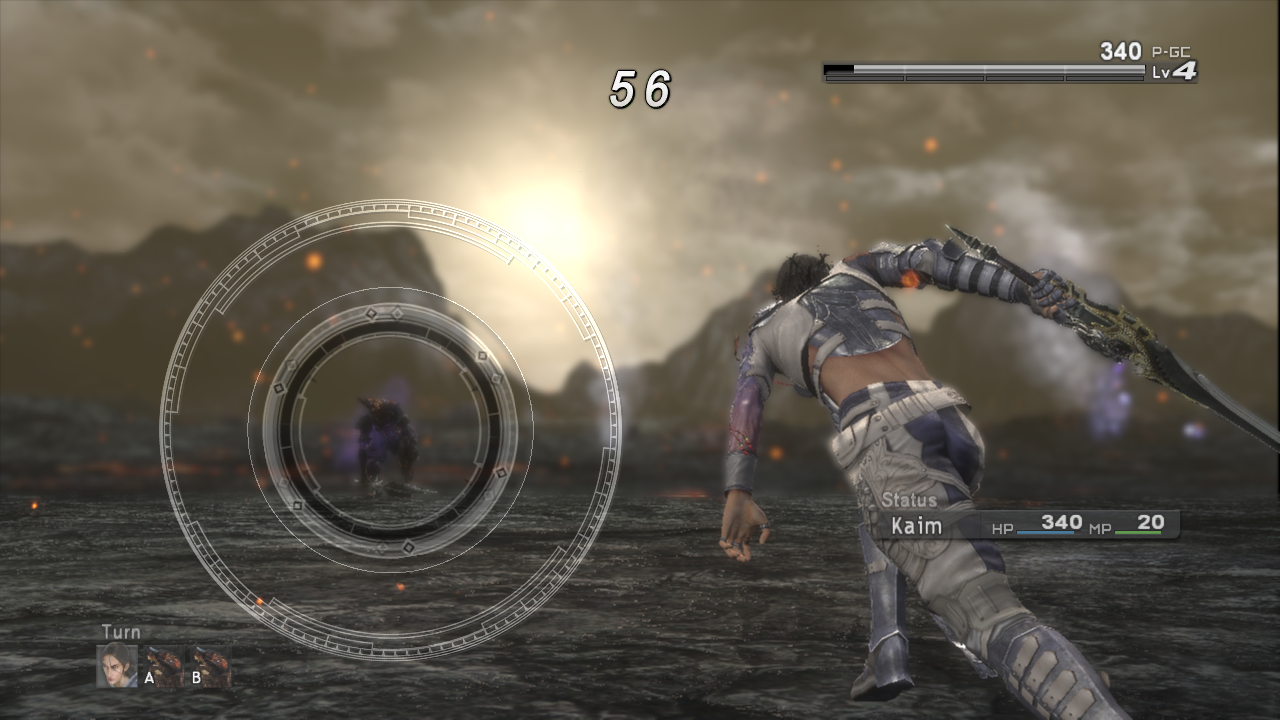 | 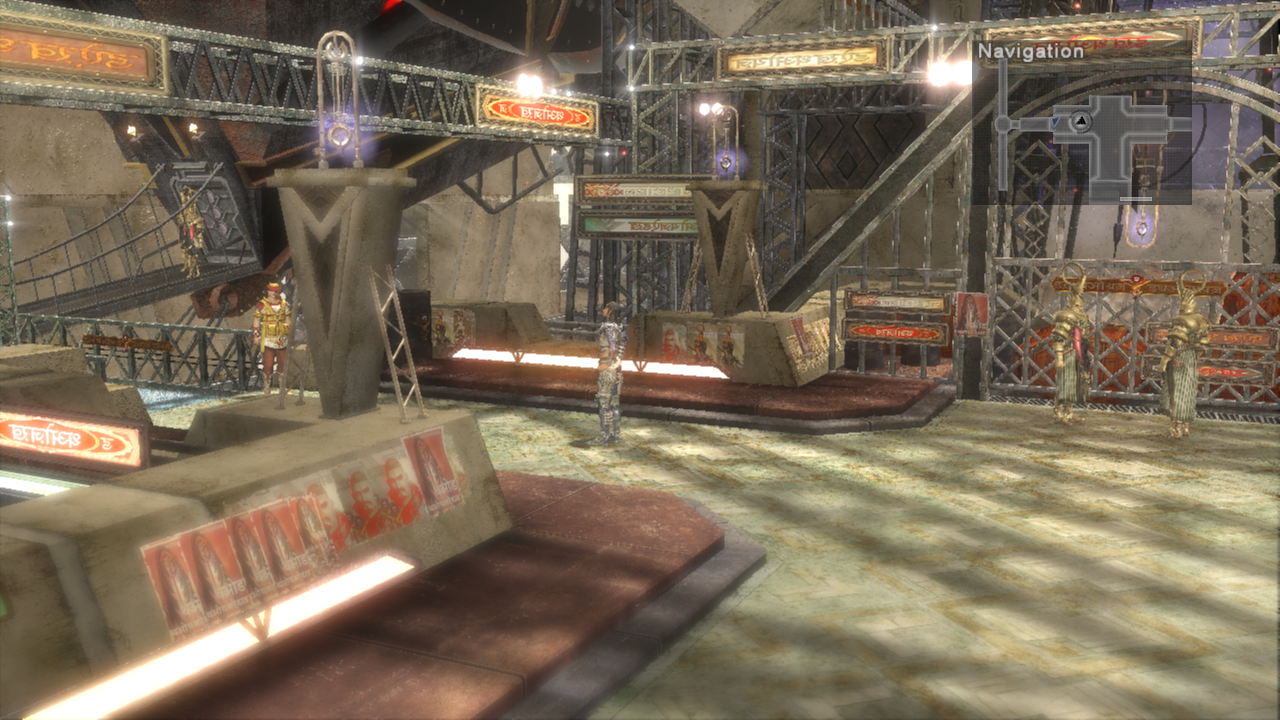 |
Unmodified screenshots from development builds leading up to v0.1.
Development
See Building for dependencies and build commands, Developer tools for the available utilities, and the documentation index for current references and historical notes.
| Directory | Contents |
|---|---|
LostOdysseyRecomp/ | Host kernel, graphics, audio, input and debugging |
LostOdysseyRecompLib/ | Configuration; ignored private/ game data and generated ppc/ code |
tools/ | Recompilers, dependency patches, Ghidra scripts and the optional assembly profiler |
thirdparty/ | Rendering, audio and other dependencies |
docs/ | Current status, guides, research and historical archives |
Sponsors
Thank you to Cristian and Whitesun for supporting the project on Ko-fi.
Credits and game data
With research and tools from UnleashedRecomp, re:Blue, XenonRecomp, XenosRecomp, plume and Xenia. Audio uses the pinned Xenia FFmpeg fork, with its license. On Android, the custom Adreno GPU drivers (Mesa Turnip builds) come from the driver list of the Eden emulator and load through libadrenotools.
Lost Odyssey and its assets belong to their respective owners. This is an unofficial project. Supply data extracted from your own discs; do not commit game executables, resource archives, textures, audio, video, generated game code or captures to this repository. Dependencies retain their respective licenses.
From the project's repository, fetched . Images load from GitHub.
Releases
Feed-
Release notes
English
- HDR now works with every anti-aliasing mode (FXAA, SMAA, TAA) and every upscaler (DLSS, FSR, MetalFX), and with DLSS frame generation on Vulkan.
- Added Graphics settings for shadow resolution (1×, 2×, 4×) and experimental ambient occlusion (Off, SSAO, GTAO).
- Vulkan and Metal now share one shader pack,
portable_vk.lospv. The first start after updating offers to download the new packs. - Fixed the sun and its glare flashing through cliffs while sailing (#118).
- Added support for 8BitDo controllers such as the Ultimate 2 Wireless (#97, contributed by Xarishark).
- More Settings texts are translated into Japanese, Korean and Simplified Chinese.
- On Windows, a broken
OptiScaler.dllno longer shows an error dialog at startup. - The macOS app now requires macOS 15 or later.
- This release does not include an Android APK yet.
简体中文
- HDR 现在可以和任一抗锯齿模式(FXAA、SMAA、TAA)、任一超分(DLSS、FSR、MetalFX)以及 Vulkan 上的 DLSS 插帧同时开启。
- 画面设置新增阴影分辨率(1×、2×、4×)和实验性环境光遮蔽(关闭、SSAO、GTAO)。
- Vulkan 和 Metal 现在共用一个着色器包
portable_vk.lospv。更新后第一次启动会提示下载新的着色器包。 - 修复开船时太阳和光晕穿过悬崖闪出来的问题(#118)。
- 支持 8BitDo 手柄,例如 Ultimate 2 Wireless(#97,由 Xarishark 贡献)。
- 设置菜单又有一批文字翻译为日语、韩语和简体中文。
- Windows 上,损坏的
OptiScaler.dll不再在启动时弹出错误对话框。 - macOS 版本现在需要 macOS 15 或更高版本。
- 本版本暂不提供 Android APK。
-
v0.7.35 896
Release notes
English
- Added the first macOS package,
LostOdysseyRecomp-macos-arm64-v0.7.35.dmg: a disk image withLostOdysseyRecomp.appand an Applications link, for Apple Silicon Macs, rendering with Metal. The app declares macOS 14.0 as its minimum, but it has only run on macOS 26.6.2, and its bundled shader compiler (DXC) is built for macOS 15. It is experimental, ad-hoc signed and not notarized, so macOS blocks the first launch: try to open the app, then choose Open Anyway in System Settings → Privacy & Security, or runxattr -dr com.apple.quarantine /Applications/LostOdysseyRecomp.app(steps). On macOS the update check only offers to open the release page, when a newer release has a disk image; it never replaces the app. On the maintainer's M1 Max (macOS 26.6.2) the opening new-game battle ran with Metal and used the downloaded Metal shader pack; Metal HDR output has not been seen (see the HDR entry). Long play, broader scenes and other Macs have not been tested. - Shaders compiled on your PC are now kept in one file per renderer instead of one file per shader. On the maintainer's PC that folder held 39,083 files, including about 10,500 left over from older versions. A translator update now recompiles only the shaders whose generated code changed. In a test that threw away the startup cache, all 28,687 shaders came back from the new file in 2 seconds without compiling, where the same situation used to mean about 3 minutes of compiling. The first start after updating moves the existing files into the new one once, about 20 seconds without compiling, then deletes them, together with files from older versions (details).
- When no precompiled shaders for the selected renderer are installed, the game now offers to download them at startup, after the update check and before it prepares shaders. The window shows the size and the download progress, and the download can be cancelled. Skipping compiles the shaders on your PC as before and is remembered until the shaders change. A download is used only if its size and SHA-256 match the published list and it fits the game; otherwise the game compiles as before. Release packages no longer include a shader pack; the published packs cover Vulkan, DirectX 12 and Metal (details).
- Added a guard to the game's touch-entry check: while a battle request is queued or loading, it takes the existing rejection branch before a container can close the menu or set its destroyed flag (#114 investigation). Tests using the original game functions and single-file compilation passed; gameplay validation of the reported softlock remains pending.
- Screens taller than 16:9, such as 16:10 (Steam Deck and MacBooks), 3:2 and 4:3, now show the 3D scene across the whole screen with a taller field of view, instead of bars above and below it. Menus and movies keep their 16:9 layout with bars, the minimap moves toward the top, and menus on ultrawide screens get bars at the sides. A render-resolution setting now sets the size of the 16:9 area, so 720 renders 1280x800 on a 16:10 screen and 1280x960 on 4:3. Frame generation now also runs on these screens; that has not been tested. Checked on Vulkan in Uhra at 4:3, 3:2, 16:10 and 21:9 (scene, menu and Status); battles, movies, Direct3D 12 and Metal have not been checked (details).
- Added experimental HDR output paths for Windows Direct3D 12/Vulkan, Linux Vulkan and macOS Metal. The Graphics menu now opens a frozen comparison frame: left is an SDR brightness preview clipped at reference white, right is normal HDR tone mapping with live peak adjustment. Mouse/controller X switches Scene and Test pattern; missing scenes use the standard pattern, and the menu copies its source once on open. Automatic peak follows a usable display report or a 1000-nit content fallbac…
- Added the first macOS package,
-
Release notes
Precompiled shaders that the game downloads at startup, one file per renderer and shader contract. index.json lists them. Version releases no longer include these files; this prerelease is not a game version.
-
v0.7.25 907
Release notes
English
- Added an experimental Apple Silicon macOS arm64/Metal integration path, including source-build and packaging workflows. Local Windows and Mac runtime builds compile and link, and a limited new-game/first-battle test passed; long play, broader scenes, image quality, performance validation and package publication remain pending.
- Future Windows ZIPs now write SHA-256 string values for every payload in
manifest.files, so legacy v0.7.0–v0.7.3 updaters can consume the new manifest shape. The current updater still consumes paths only; this does not restore runtime hash validation. - Added a Force RB Party Switch button next to Save Anywhere in the F1 debug menu (#74). A save made with Save Anywhere during a split-party section loses RB character switching after loading, because the event script keeps that permission in memory only. The button turns it back on: with the reporter's save in Astral Square, the Change Character prompt returned and RB switched between the two groups in both directions. It only has an effect in areas whose script offers party switching. Save Anywhere now also stays off while the party is split, so the System menu's Save follows the game's own rule there and new saves can no longer lose switching.
- Fixed the sky flickering with TAA and FSR in the disc 4 Legacy of the Eastern Tribe area (#102). The sky's depth pass was jittered but its colour pass was not, so on some jitter phases the whole sky failed the depth test and showed a dark fallback. The colour pass now gets the same jitter. Its draw also no longer disables object motion vectors for the whole frame in this area, a likely cause of the reported smearing on the rest of the image. With the reporter's save on D3D12 at 3840x2160, the dark sky appeared in 41 of 134 screenshots with TAA and 38 of 102 with FSR 3.1 Quality before the fix, and in none of 98 and 90 after it. Reporter confirmation is pending.
- Runtime logs can now locate this kind of flicker without an F1 capture. While TAA, FSR or DLSS jitter is on, the log names each unmapped shader pair that draws the scene camera into the main scene depth and either writes depth or redraws geometry whose depth pass was jittered, together with the constants a regression test needs. The log also records every map the game loads, so the line before a report shows where it happened. Each report is about 2 KB and at most 32 are written per run.
tools/capture_analysis/suspect_log.pyturns these lines into a summary and a test fixture. With the #102 fix removed, the reporter's save reported exactly the #102 sky pair in Legacy of the Eastern Tribe, and its constants matched the earlier F1 capture. - Hardened the runtime against malformed or unexpected game requests found in a code review (details). File queries check the buffer size before writing, file reads report seek and read errors instead of returning stale data, oversized memory allocations fail instead of wrapping around, and the GPU command processor rejects recursive, over-deep or truncated command lists. Textures the game changes outside the regions checked every frame are now re-read within 16 frames. Loading the Uhra save and rendering it at 3840x2160 behaved as on main, and the frame rate without a cap stayed level with main (about 141 vs 137 FPS averaged over eight alternating runs).
- On Linux, the Flatpak update notice now explains how to download the new
.flatpakbundle and install it, in all five interface languages. Theflatpak updatecommand it showed before does not work for the standalone bundles. Installations that keep settings under~/.configalso check that file, instead ofsettings.iniin the current directory, to decide whether to run first-time setup.
简体中文
- 加入 Apple Silicon macOS arm64/Metal 实验性整合路径,并提供源码构建和打包流程。Windows 和 Mac 本地运行时已完成编译链接,有限的新游戏和首战测试已通过;长时间游玩、更广场景、画质、性能验证和安装包发布仍待完成。
- 后续 Windows ZIP 会在
manifest.files中为每个 payload 写入 SHA-256 字符串,使 v0.…
-
v0.7.20 1.2k
Release notes
English
- Capped frame generation multiplier requests at 6×, the most DLSS multi-frame generation supports. The Graphics menu offers 2× to 6×,
settings.inivalues above 6 fall back to 2×, andLO_FG_MULTIPLIERaccepts 2 to 6. Each request is still limited to what the GPU and driver report. - Keep Windows native messages pumping during GPU shutdown to prevent a DXGI quit-to-desktop deadlock (#82). The hang reproduced locally in D3D12 exclusive fullscreen with DLSS frame generation, and the fixed build quit in about 2 seconds. Reporter confirmation is pending.
- Reduced command-processor CPU overhead on the default render path.
WAIT_REG_MEMpolls wake as soon as an interrupt callback finishes instead of sleeping through the poll interval, constant and fetch register runs are copied in bulk, debug environment variables are read once, and a texture-set cache miss rewrites only the bindings that can change. In the Uhra plaza at 3840x2160 on D3D12 with a 120 FPS target, the frame rate rose from about 98 to about 119 FPS, which is the cap, and command-processor CPU time fell from about 8.6 to about 5.9 ms per frame. With the frame cap removed through theLO_FPS=0diagnostic override, the same scene ran at about 142 FPS, compared with about 96 FPS on main. - Skipped redundant D3D12 state changes. The renderer no longer re-sends an identical pipeline, a single identical viewport or scissor, or the same render targets to the driver. In the Uhra plaza at 3840x2160 without a frame cap, the frame rate rose from about 156 to about 159 FPS.
- Guest textures now load their mip chains (#87). The renderer previously uploaded only the largest level of each texture, so anisotropic filtering had no smaller levels to filter and distant surfaces could not be filtered down. Tiled 2D textures now upload the levels stored in guest memory, following Xenia's guest layout, and the Xenos base-map mip filter stays on level 0. Forcing a minimum LOD of 2 in a local test showed every level decoding without corruption. In the Uhra plaza at 3840x2160 most ground is magnified, so screenshots barely change; at 1280x720 distant ground is slightly smoother. Cube, 3D and linear textures still load one level. Reporter confirmation is pending.
简体中文
- 插帧倍率上限改为 6×,即 DLSS 多帧生成支持的最大值。图形菜单只提供 2× 到 6×,
settings.ini中大于 6 的值回退为 2×,LO_FG_MULTIPLIER只接受 2 到 6。每次请求仍受显卡和驱动报告的上限限制。 - 退出期间继续处理Windows窗口消息,修复DXGI清理时可能出现的退出桌面死锁(#82)。本机在D3D12独占全屏并开启DLSS插帧时复现了卡死,修复后约2秒正常退出;报告者复测待完成。
- 降低默认渲染路径中命令处理器的 CPU 开销:
WAIT_REG_MEM轮询在中断回调完成后立即唤醒,不再睡满整个轮询间隔;常量和 fetch 寄存器的连续写入改为批量复制;调试环境变量只读取一次;纹理描述符集缓存未命中时只重写可能变化的绑定。在 D3D12、3840x2160、120 FPS 目标下的 Uhra 广场,帧率从约 98 FPS 提升到约 119 FPS(已到上限),命令处理器 CPU 时间从约 8.6 降到约 5.9 ms/帧。用LO_FPS=0诊断开关取消帧率上限后,同一场景约 142 FPS,main 约 96 FPS。 - 跳过重复的 D3D12 状态设置:管线、单个视口或裁剪框与当前绑定完全相同,或再次绑定同一组渲染目标时,不再重复提交给驱动。在 3840x2160、不限帧的 Uhra 广场,帧率从约 156 FPS 提升到约 159 FPS。
- 游戏纹理现在会加载完整的 mip 链(#87)。之前渲染器只上传每张纹理的最大一层,各向异性过滤没有更小的层级可用,远处表面无法被过滤。现在分块(tiled)2D 纹理会按 Xenia 的游戏内存布局上传所有已存储的层级,Xenos 的 base-map mip 过滤仍只采样第 0 层。本机测试中强制最小 LOD 为 2 时,各层级解码正常,没有花屏。在 3840x2160 的 Uhra 广场,大部分地面处于放大采样,截图几乎没有变化;在 1280x720 下远处地面略微平滑。立方体、3D 和线性纹理仍只加载一层。报告者复测待完成。
- Capped frame generation multiplier requests at 6×, the most DLSS multi-frame generation supports. The Graphics menu offers 2× to 6×,
-
v0.7.15 1.5k
Release notes
English
- Added native 90/120 FPS graphics targets and FreeSync / G-SYNC Compatible VRR output pacing. Switching from DLSS FG to FSR FG requires a restart.
- Added an optional Graphics RGB Range expansion from 16–235 to 0–255, plus Hold/Toggle speed mode in F1 Cheats; Hold remains the default.
- Fixed the Hungry Man errand timer at higher frame rates and made portable installs prefer the
gamedirectory beside the executable, with../gameretained as a fallback. - Added a targeted TAA jitter mapping for the reported sky-flicker path. Broader gameplay and physical-display acceptance remain pending.
简体中文
- 新增原生 90/120 FPS 图形目标和 FreeSync/G-SYNC Compatible VRR 输出节奏控制。从 DLSS FG 切换到 FSR FG 必须重启。
- 图像设置新增可选的 RGB Range 扩展,将游戏画面的 RGB 范围从 16–235 扩展到 0–255;F1 Cheats 新增按住/切换变速模式,默认仍为按住。
- 修复高帧率下 Hungry Man 差事计时,并让便携式安装优先使用可执行文件旁的
game目录,同时保留../game作为后备路径。 - 针对反馈的天空闪烁路径新增限定范围的 TAA 抖动映射;更广游戏流程和实体显示验收仍待完成。
-
v0.7.10 1.5k
Release notes
English
- Added refreshed bundled Vulkan shaders with 19 additional captured shader records.
- Added a separate DX12 shader pack for
shaders/portable_dx12.lospd.
简体中文
- 更新内置 Vulkan shader,增加 19 条捕获的 shader 记录。
- 新增独立 DX12 shader pack,放入
shaders/portable_dx12.lospd。
-
Release notes
English
- Added Windows D3D12 frame generation in Graphics: Off/DLSS/FSR, DLSS multipliers and fixed 2× FSR. Save to apply without restarting.
- Fixed stale rendering bindings and Vulkan frame-generation input handling.
- Fixed AppImage compatibility with Ubuntu 22.04 and improved Flatpak packaging.
- Simplified Windows updates while preserving rollback on failure.
简体中文
- 图像设置新增 Windows D3D12 帧生成:关/DLSS/FSR,支持 DLSS 倍数及固定 2× FSR,保存后无需重启即可生效。
- 修复残留渲染绑定与 Vulkan 帧生成输入处理。
- 修复 Ubuntu 22.04 AppImage 兼容性,改进 Flatpak 打包。
- 简化 Windows 更新流程,保留失败回滚。
-
v0.7.3 610
Release notes
English
- Issue #70 DX12/Vulkan groundwork adds DX12 graphics/compute native root signature and root descriptor table de-duplication with lifecycle invalidation, plus opt-in
LO_RENDER_TIMINGcounters andDiagnostic/Lightweightcapture modes. Runtime, NGX/FSR, AF, root-binding, local DX12/Vulkan substitute-scene, and patch-application checks passed within their documented bounds; no optimization A/B, stable 60 FPS, player acceptance, or Issue #70 resolution is claimed. See the Issue #70 note. - Delivery automation: Release packaging workflow permits uploading missing assets to existing public releases without clobbering existing files, with PowerShell failure checking (commit
0d92b2bonmain). GitHub Release v0.7.3 was published at 2026-09-27T18:01:05Z from tag commitfd139e3c0407309de0cd3d4e5724c59d4363e4ab; its three public assets are the Windows ZIP, Linux AppImage, and stable Linux Flatpak, each returning HTTP 200. Release CI 36335854660 passed; checksum/source records remain internal CI or local evidence, with no runtime archive or standalone checksum/source attachment.
简体中文
- Issue #70 DX12/Vulkan 优化基础:新增 DX12 graphics/compute 原生 root signature 与 root descriptor table 去重及生命周期失效,并提供可选的
LO_RENDER_TIMING计数与Diagnostic/Lightweight采集模式。runtime、NGX/FSR、AF、root binding、本机 DX12/Vulkan 替代场景及补丁应用检查已在记录范围内通过;不宣称优化前后 A/B、稳定 60 FPS、玩家验收或 Issue #70 已解决。详见Issue #70 记录。 - 交付流程自动化:发布工作流支持在不覆盖已有文件的前提下向现有公开 Release 补充缺失资产,并增加 PowerShell 失败检查(
main分支提交0d92b2b)。GitHub Release v0.7.3 已于 2026-09-27T18:01:05Z 从 tag commitfd139e3c0407309de0cd3d4e5724c59d4363e4ab发布;公开资产仅为 Windows ZIP、Linux AppImage 和 stable Linux Flatpak,三者均返回 HTTP 200。Release CI 36335854660 已通过;checksum/来源记录保留为 CI 或本地内部证据,不包含 runtime archive 或独立 checksum/source 附件。
- Issue #70 DX12/Vulkan groundwork adds DX12 graphics/compute native root signature and root descriptor table de-duplication with lifecycle invalidation, plus opt-in
-
v0.7.2 523
Release notes
English
- DLAA sizing correction: successful NGX sizing validates nonzero ordered
min / optimal / maxextents and uses the output extent when it is within range, avoiding falseSizingErrorresults.LoNativeDlaaTestpassed 1,380 CPU contract checks across the logged resolutions, fallback recovery, range rejection and ordinary SR extent preservation; standalone SDK 310.9.1 clang-cl compilation also passed. - Windows D3D12 SR: added local DLSS SR/DLAA NGX and FSR backend routes using offline DXIL inputs. Fixture readback, hybrid motion checks and corrected motion shader coverage passed. Bounded RTX 5080 Uhra camera-only runs with object motion disabled passed for DLSS Quality, FSR Quality, DLAA and FSR Native AA; camera/depth reconstruction supplies the limited motion fallback when native object motion is unavailable. Broader scenes, image quality and player acceptance remain open.
- Published at GitHub Release v0.7.2 on 2026-09-27T08:59:13Z from merge commit
e2fc909dc15757aa5180566cecfd1ef2ff25dd18. Release CI 36305268629 passed; all ten assets were uploaded with matching GitHub SHA-256 and size records. Windows ZIP/source and manifest checks, AppImage sidecar checks, and Flatpak CI passed. Experimental Frame Generation remains build-gated/default-off and belongs to the v0.8.0 development plan; it is not an enabled v0.7.2 release feature.
简体中文
- DLAA 尺寸修正:成功的 NGX 尺寸查询检查
min / optimal / max均为非零且顺序有效,并在输出尺寸落在范围内时使用输出尺寸,避免错误的SizingError。LoNativeDlaaTest已通过 1,380 项 CPU contract checks,覆盖记录的分辨率、fallback 恢复、范围拒绝和普通 SR 尺寸保持;SDK 310.9.1 的 clang-cl 单独编译也已通过。 - Windows D3D12 超分:新增使用离线 DXIL 输入的本地 DLSS SR/DLAA NGX 与 FSR backend。GPU fixture 读回、hybrid motion 检查和修正后的 motion shader 覆盖均已通过。RTX 5080 Uhra 相机专用运行在关闭物体运动时通过 DLSS Quality、FSR Quality、DLAA 与 FSR Native AA;原生物体运动不可用时可使用有限的相机/深度重建。更广场景、画质和玩家验收仍待完成。
- v0.7.2 已于 2026-09-27T08:59:13Z 发布到 GitHub Release,来源为 merge commit
e2fc909dc15757aa5180566cecfd1ef2ff25dd18。Release CI 36305268629 已通过;10 个资产均已上传,GitHub SHA-256 与大小记录一致。Windows ZIP/来源和清单核验、AppImage sidecar 核验及 Flatpak CI 均已通过。实验性插帧仍受构建开关控制且默认关闭,属于 v0.8.0 开发规划,不是 v0.7.2 已启用的发布功能。
- DLAA sizing correction: successful NGX sizing validates nonzero ordered
-
v0.7.1 452
Release notes
English
- In-game disc and DLC re-import: Gameplay settings adds "Import discs & DLC", confirming a restart with
--installafter waiting for the existing guest process to exit (Windows and Linux). The installer review allows selecting specific discs or DLCs to re-import, replacing only selected items while preserving unselected content, staging all files before final publish, and rolling back on failure or cancellation. Game paths update on commit callback without changing defaults on DLC-only imports or missing Disc 1; protects source media, saves, profiles, and cache. - Flatpak packaging and runtime support: Added official Linux Flatpak bundle generation (
LostOdysseyRecomp-linux-x64-v0.7.1.flatpak) and runtime archive (LostOdysseyRecomp-linux-x64-v0.7.1-flatpak-runtime.tar.xz), targeting theorg.freedesktop.Platform 26.08runtime and SDK with Clang/LLVM 22. Incorporates an upstream SDL 2.30.12 PipeWire audio compatibility patch (6be87ceb33a9aad3bf5204bb13b3a5e8b498fd26) with PipeWire enabled, bundles DLSS and FSR runtime assets and licenses, and strictly excludes private disc assets and source code from the exported package. Real-device installation and launch verified on target hardware with user acceptance ("验证通过").
简体中文
- 游戏内光盘与 DLC 重新导入:游戏玩法(Gameplay)设置新增“导入光盘与 DLC”(Import discs & DLC),确认后等待旧游戏进程退出并带
--install重启(支持 Windows 与 Linux)。安装器 Review 界面支持选择特定光盘或 DLC 进行增量重导,仅替换所选项并保留未选内容,全量暂存完毕后统一发布,失败或取消时自动回退。提交回调中更新游戏路径,仅导 DLC 或缺少 Disc 1 时不修改默认启动路径;保护源介质、存档、配置文件与缓存。 - Flatpak 打包与运行支持:新增官方 Linux Flatpak 独立 bundle(
LostOdysseyRecomp-linux-x64-v0.7.1.flatpak)与运行环境归档(LostOdysseyRecomp-linux-x64-v0.7.1-flatpak-runtime.tar.xz),基于 Freedesktop SDK/Platform 26.08 与 Clang/LLVM 22。整合 SDL 2.30.12 上游 PipeWire 兼容补丁(6be87ceb33a9aad3bf5204bb13b3a5e8b498fd26)并启用 PipeWire,打包 DLSS 与 FSR 独立运行依赖及许可,严格排除私有光盘数据与源代码。实机安装与启动已获用户验收(“验证通过”)。
- In-game disc and DLC re-import: Gameplay settings adds "Import discs & DLC", confirming a restart with
-
v0.7.0 601
Release notes
English
- PlayStation controller prompts: SDL tracks the most recently active controller and switches Xbox/PlayStation glyphs in the host UI and supported guest menu textures. The bounded controller and scene review was accepted by the user; this does not claim universal hardware or full-game coverage.
- DLSS/DLAA fallback: unavailable or failure-disabled frame plans substitute SMAA for saved TAA while preserving Off/FXAA/SMAA settings. Focused CPU recovery and routing checks passed.
- Upscaling acceptance: Native Vulkan DLSS Super Resolution / DLAA and FSR 3.1.4 P2 multi-platform visual and runtime validation for the v0.7.0 scope passed user acceptance within the documented test coverage. Frame Generation and macOS remain planned for v0.8.0.
- Mod API: merged PR #68 adds the v1 image mod ZIP/
LOTEX1packer, native menu atlas/font page replacement, the C++ Mod API, and Python/CI coverage. General guest texture, TTF, model, and movie replacement are not included; native visual and Mod Organizer 2/USVFS acceptance remains pending.
简体中文
- PlayStation 手柄按键提示:SDL 跟踪最近活动的控制器,在宿主界面和已支持的客端菜单纹理中切换 Xbox/PlayStation 提示。限定范围的手柄与场景复核已获用户验收,不外推至所有硬件或全游戏。
- DLSS/DLAA 回退:不可用或因失败被禁用的帧计划使用 SMAA 替代已保存的 TAA,同时保留 Off/FXAA/SMAA 设置。定向 CPU 恢复与路由检查已通过。
- 超分验收:v0.7.0 范围内的原生 Vulkan DLSS 超分辨率/DLAA 与 FSR 3.1.4 P2 多平台画质及运行验证已在既有测试覆盖内通过用户验收。插帧和 macOS 仍规划在 v0.8.0。
- Mod API:PR #68 新增 v1 图像 Mod ZIP/
LOTEX1打包器、原生菜单图集与字体页面替换、C++ Mod API 以及 Python/CI 覆盖。客端通用纹理、TTF、模型和影片替换不在本版本范围内;原生画面与 Mod Organizer 2/USVFS 验收仍待完成。
-
v0.6.20 369
Release notes
English
- OpenCode render workflow now defaults to one agent, script summaries and reuse of unchanged shader reviews/tests; additional agents require a user request.
- Developer tooling: added reusable offline F1 capture preview, full-frame coverage, trace, and temporal-jitter candidate tools, a streaming private feedback-coverage report, a task-based tools index, the recovered private feedback-archive package, and an installable OpenCode render-investigation workflow; reviewed candidates remain separate from the production shader map.
- Historical temporal jitter mapping batch: added 35 reviewed VS mappings (map 84→119) across slots 0/1/4/7/8, with 44 candidate VS held for unresolved clip-XY producer or mixed-camera evidence.
LoTemporalJitterTest --feedback-mapping-batchpassed 216,625 focused checks; later entries record the separately authorized follow-up trials and their bounded acceptance scope. - Temporal jitter held-candidate follow-up: added one limited slot-8 mapping for the late-light candidate observed at
draw1206..1210, aligning the floor light pass with the scene depth/material jitter path. The map now contains 120 entries after the earlier 35-source batch. Captured-floor CPU checks passed 334,086 checks and the mapping batch passed 216,624 after removing this held candidate; the complete Windows SDK-on build succeeded, and the user accepted the bounded RTX 5080 floor-scene run. Broader runtime coverage remains open. - Hybrid SR and bounded NGX sizing recovery: development builds include camera/depth Hybrid motion fallback for DLSS/FSR and bounded retry recovery for transient DLSS sizing failures; validation remains limited to the documented scope.
- F1 capture diagnostics: full-frame jitter candidate triage is now the default, with strict geometry/depth pairing available as a separate report; successful draw records include jitter/uploaded-VP and tex0 binding metadata while preserving unknown states when evidence is incomplete. Capture command records do not imply GPU completion, and reviewed fixture export behavior is unchanged.
- Late-pass e810 trial: added a guarded
e810cfacc107fd3c/fe31slot-7 path requiringconstantScreenSample, valid format-6 2D guest 1×1 tex0, repeat UV, no same-address resolved hit and no VS tex0 read. The SDK-on guarded build exited 0 and--captured-f6131-e810passed 66,252 checks across 32 phases at 1440p/4K. Independent capture review confirmed the mapping applied and bound on every accepted frame; the bounded RTX 5080 visual run was accepted by the user. Remaining candidates are tracked separately in the screen-sampling batch, and no broad candidate mapping is claimed. - Screen-sampling candidate batch: authorized a separate manual trial adding exactly 40 VS mappings (35 slot 7, 5 slot 8) covering 101 observed PS pairings, excluding the two mixed-camera cases. The selector passed 78,316 CPU checks across 32 phases at 1440p/4K, with 0.487798 px old separation and 0.000279 px maximum projection error. The batch build passed, package
manual-screen-batch1is available, and the user accepted the manual run; no new capture evidence, whole-game or cross-hardware claim is made, and v0.6.20 was published on 2026-09-25. - Capture CLI maintenance: fixed the direct
image_diff.pysubprocess path after aninspect.pyimport collision and kept the image comparison path Pillow-only; two affected checks, including the direct CLI regression, passed. - Exploration bridge flicker investigation: aligned two observed material position paths with scene depth through the temporal-scene slot mappings
a027ab99fa3e3b0d -> slot 7andff769ec7b88e575f -> slot 8. The focused--captured-f2548-layerscheck passed 722,316 checks across 11 captured draws and 32 phases at 720p through 4K; the old-material negative control showed 0.487760 px separation. A later bounded floor-light follow-up was accepted on RTX 5080; broader same-scene coverage remains open; the fix is included…
-
v0.6.19 485
Release notes
English
- Live anisotropic filtering: added live anisotropic filtering controls (
Off / 2x / 4x / 8x / 16x) to the Graphics settings menu, persisted underanisotropic_filteringinsettings.ini(defaulting to Off) and clamped to the Vulkan device's hardware maximum. Changes apply upon saving graphics settings on the next rendered frame without restarting the game. Replaced mutable sampler descriptor tables with an immutable generation-based architecture (sampler_palette.h): candidate tables are assembled in advance and replace the active table only after allocations succeed, while previous generations remain pinned to active GPU command batches until fence completion, preventing in-flight descriptor races and allocation failures from corrupting active draws. Bounded Windows and Linux standalone CPU contract tests and Linux software Vulkan emulation (Actions 36079262997, covering 1,000 mode switches, fault injections, descriptor lifetimes, andsettings_interaction1/1) passed; physical-hardware GPU testing across all gameplay scenes remains open. Guest mip selection, single-level texture upload, and shader translation remain untouched; AF does not resolve distant-texture shimmer caused by missing mip chains. - Settings menu DLSS and FSR quality ordering: DLSS quality choices and left/right cycling now order consistently as Performance, Balanced, Quality, and DLAA, with FSR placing Native AA last. Persisted configuration values, defaults, and GPU runtime behavior remain unchanged. Rebuilt standalone
LoMenuFlowTestpassed across all 8 test groups; physical-hardware verification across all quality levels remains pending. - Settings menu interaction and performance: merged AA and DLSS/FSR selection into a unified flow, placed FSR sharpness directly after quality, and kept Save last. A confirms actions and dialogs only; Left/Right adjusts choices, with mouse adjustment retained. Cached static menu decoration at native output resolution to avoid repeated full-background software filtering on navigation; real-device end-to-end latency is not measured.
- System and Settings quit menu actions:
- Swapped the native System menu quit entry to "Quit to Desktop" across all nine supported game languages. Trailing garbage characters observed in in-game captures were resolved by including the UTF-16 null terminator in the string copy bounds. The native confirmation Yes routes to
SDL_QUITwith cancel recovery. In bounded physical-hardware testing on a verified build, the user explicitly confirmed that selecting and confirming "Quit to Desktop" in the native System menu successfully exits the game process. - Added a "Quit to Main Menu" action at the bottom of the System -> Settings -> Game page, supporting English, Traditional Chinese, Simplified Chinese, Japanese, and Korean. Confirmation defaults to Cancel, and Back cancels; confirming waits for retail Settings close completion before returning directly to the title screen without posting
SDL_QUITor saving settings. StandaloneLoMenuFlowTestpassed all 8 test groups; physical-hardware execution and dialog display remain unverified by users item by item.
- Swapped the native System menu quit entry to "Quit to Desktop" across all nine supported game languages. Trailing garbage characters observed in in-game captures were resolved by including the UTF-16 null terminator in the string copy bounds. The native confirmation Yes routes to
- Debug Save Anywhere persistence (Issue #61): preserved the debug "Save Anywhere" toggle across sessions in
settings.iniwithout adding it to the player settings menu. The setting defaults to disabled and persists immediately when toggled in the debug menu while keeping unconfirmed graphics previews intact. Windows standalone testLoSaveAnywhereConfigTestpassed configuration parsing, cross-process restoration, and preview coexistence. In-game validation on physical hardware remains pending, and camera offset upon reload remains a known limitation. - Controller and usability improvements:
- Cheats sidebar: LT selects the previous category and RT the next, wrapping at either end with single-step navigation per press; added an on-screen English/Chinese control footer. Controller switching was confirmed on a physic…
- Live anisotropic filtering: added live anisotropic filtering controls (
-
v0.6.15 308
Release notes
English
- Battle motion-vector replay follow-up (P2 remains in progress): added exact shader-slot mappings for three observed battle vertex programs and a shared quad-list geometry helper. CPU checks passed 768 clips; GPU fixtures compiled the six mapped microcodes to DXIL/SPIR-V and passed Vulkan replay checks for alpha discard, palette motion, and two-quad geometry. A bounded RTX 5080 Vulkan manual battle run on candidate
cb41c99recorded 2,476 completed FSR uses and no motion-vector first failures in that run. This is bounded scene evidence; broader scene/platform coverage and full P2 acceptance remain open.02d8remains unmapped, and thef6mapping is fixture-only with no observation in that game run. - Experimental opt-in FSR SR development updates:
- Added the fixed FidelityFX SDK v1.1.4 (FSR 3.1.4) source-build path for Windows and native Linux behind
LO_ENABLE_FSR=ONandLO_REQUIRE_FSR=ON, with bounded Windows execution evidence for all four presets and native Linux RADV Quality, Performance and Native AA submissions. Full quality/performance, Steam Deck, player, and DLSS frame-generation acceptance remain pending. - Added opt-in three-frame FSR input/output capture with completed-submission metadata, camera/depth motion diagnostics, and bounded right-stick test input. Controlled Windows translation/yaw checks passed for static geometry; this is not full image-quality acceptance.
- Added explicitly enabled raw material-alpha replay for six audited shader pairs, with R8 MAX accumulation and same-draw color/depth readback diagnostics. Windows and native Linux RADV town captures produced nonzero alpha while preserving original color and depth bytes. Postprocess propagation and SDK reactive/transparency inputs remain pending.
- Added opt-in alpha-mask resolve/fetch bridging with frame, allocation, write-version and final-image checks. A Windows town capture copied 409,440 pixels exactly, including 150 nonzero pixels, and linked reused resolves to the actual shader bindings. Later P2 work verified the Windows SDK reactive mask input; Linux builds were performed for earlier bridge revisions, not the latest battle shader mappings.
- Added opt-in completed-submission GPU timestamps for the isolated FSR prepare/SDK/encode/copy path. Windows runtime diagnostics produced valid query records; this does not establish a performance improvement.
- Added pixel coverage qualification for fractional viewports and exact rectangle corner checks for P2 R8 alpha postprocess propagation. Intersected resolve validRect bounds to keep padding invalid, added
depth_color_tile_cleartracking with qualifying inset geometry replacement and unknown writer invalidation, permitted raw retention on initial clear while preserving old raw source disabling, separated input missing from sampler unsupported rejections, and added opt-in trace diagnostics. Python reference tools corrected Vulkan Y coordinates, fixed project HLSLFLT_MINnegative bounds handling, and added an independent clear-background checker suite. - Verified P2 postprocess routing via CPU suites (
LoNativeDlssP2RoutingTest,LoFsrAlphaPropagationPolicyTest), Python synthetic clear background and tonemap regression cases, and Windows RTX 5080 Vulkan 1280x720 FSR Quality capture (fsr-postprocess-windows-03): all 6 audited draws recorded and published with 0 interior/background pixel mismatches across 5 blur draws and 1 tone draw (correcting referenceFLT_MINartifact; original 1-pixel report preserved), 0 byte diff across original color copies, and completed independent oracle transfer chains. Detailed evidence and artifacts are recorded in FSR progress notes. - Verification limits remain bounded: full depth invariance, host prefilter substitution, broad P2 visual quality, and latest Linux battle-mapping coverage are not established. The later P2 checkpoint has separate bounded raster-edge, SDK-mask,…
- Added the fixed FidelityFX SDK v1.1.4 (FSR 3.1.4) source-build path for Windows and native Linux behind
- Battle motion-vector replay follow-up (P2 remains in progress): added exact shader-slot mappings for three observed battle vertex programs and a shared quad-list geometry helper. CPU checks passed 768 clips; GPU fixtures compiled the six mapped microcodes to DXIL/SPIR-V and passed Vulkan replay checks for alpha discard, palette motion, and two-quad geometry. A bounded RTX 5080 Vulkan manual battle run on candidate
-
v0.6.11 1.2k
Release notes
English
- Add experimental native NVIDIA DLSS Super Resolution (SR) and Deep Learning Anti-Aliasing (DLAA) support, with official packaged NGX libraries for Windows and Linux:
- Integrates official NVIDIA DLSS SDK
310.9.1(374959484e79a640feaba44c93ac8cfb0a03f5b5). Windows release ZIP packagesnvngx_dlss.dllwith static CRT bootstrap libraries, verified LICENSE and NOTICE. Linux AppImage bundles canonicalusr/bin/libnvidia-ngx-dlss.so.310.9.1withusr/libsymlinks, license, and notice. - Implements Plume Vulkan bridge extension hooks (
VulkanExtensionHooks,VulkanExtensionStatus), external command boundaries (beginExternalCommands,endExternalCommands), and capability probes (LoNativeDlssProbe,LoNativeDlssReportTest). - Implements CPU frame planner contracts with versioned 24-word snapshot packets, request signatures, geometry epochs, and exact NGX output sizing queries for 16:9, 21:9, and non-standard drawables.
- Renderer captures pre-TAA color, single-channel R32 current depth, and unjittered geometric motion vectors in input pixel units (
previousPixel - currentPixel), with explicit history reset triggers (camera cut, extent, epoch, format) and GPU fence-qualified resource retirement. - Introduces experimental DLAA mode (quality index 3) operating with 1:1 input-to-output resolution on supported RTX configurations, backed by 350 CPU contract checks (
LoNativeDlaaTest) and runtime query bounds. - Implements persistent NGX session controller supporting native
NGX_VULKAN_CREATE_DLSS_EXT1andNGX_VULKAN_EVALUATE_DLSS_EXT, monotonic submission-serial tracking, SDR qualified color encoding bypass, and destination target promotion architecture with parked low-resolution fallback mappings.
- Integrates official NVIDIA DLSS SDK
- In-game Settings menu graphics updates and list viewport scrolling:
- In Settings -> Graphics, exposed Upscaler (
Off,DLSS) and DLSS quality (Quality,Balanced,Performance,DLAA). - DLSS quality row automatically hides when Upscaler is set to
Off, preserving logical row indexing while navigation smoothly skips hidden entries. - Removed the Internal resolution row from the menu while retaining its persisted value in configuration for legacy fallbacks.
- Added scrolling support for overflowing menu lists exceeding 11 rows: visible list tracks focus, accounts for hidden rows in rendering and pointer hit testing, and displays subtle top and bottom scroll indicators.
- On Graphics and Language tabs, pressing Start (or Enter) jumps focus directly to the Save settings row without triggering an immediate save, suppressing same-tick confirm input to prevent accidental saves.
- Fixed MSVC build of the native DLSS test fixture by enforcing
/utf-8source encoding for non-BOM CJK strings inCMakeLists.txt.
- In Settings -> Graphics, exposed Upscaler (
- Release delivery & verification status:
- Published release v0.6.11 built from commit
3daba372ea34c93b65b55c25ee5daa4f4ed5573dvia Release CI 35687931776. - Public release assets verified against SHA-256 sidecars and GitHub digests: Windows ZIP
362592d16f45bc56fd686c4f0bc4c4e23e8a82eafffdcd8f6c77971ed3c9e823, Linux AppImage2e2ada519ae7b3b63be306d7d301bf26be677c0af08f13b7653c2e54c9727bf9. - Windows manifest confirms non-development version
v0.6.11, commit3daba37, and bundlednvngx_dlss.dllmatching the audited SDK. Linux AppImage SquashFS inspection confirms canonicalusr/bin/libnvidia-ngx-dlss.so.310.9.1, library symlinks, license, and notice files. - CPU tests (8/8 native DLSS suites and 350 DLAA checks), synthetic overflowing menu render tests (
LoMenuRenderTest), menu flow tests (LoMenuFlowTest), and Windows/Linux packaging builds passed. - Prior bounded live-game production runs on an RTX 5080 confirmed Quality NGX SR (
1707x960to2560x1440, DisplayEncoded color, reversed-Z depth,…
- Published release v0.6.11 built from commit
- Add experimental native NVIDIA DLSS Super Resolution (SR) and Deep Learning Anti-Aliasing (DLAA) support, with official packaged NGX libraries for Windows and Linux:
-
v0.6.7 891
Release notes
English
- Add in-game Graphics menu Widescreen switch and expanded 21:9 resolution presets (Issue #17):
- In Settings -> Graphics, a new Widescreen toggle appears immediately above Output resolution.
- When Widescreen is Off, Output resolution offers five standard 16:9 tiers: 1280×720, 1600×900, 1920×1080, 2560×1440, and 3840×2160.
- When Widescreen is On, Output resolution offers five common 21:9 ultrawide tiers: 1720×720, 2560×1080, 3440×1440, 3840×1600, and 5120×2160.
- Toggling aspect ratio maps to the nearest preset by vertical height, choosing the higher tier in equidistant ties (e.g. 900p maps to 1080p).
- The switch state is derived dynamically from configured width and height without adding new INI keys; existing 3440×1440 configurations automatically open with Widescreen enabled.
- Saving settings applies the chosen resolution and commits it to disk; exiting without saving preserves existing configuration. First-launch setup resolution choices are also updated to include matching presets. Localized terms and help descriptions are provided in English, Japanese, Korean, Traditional Chinese, and Simplified Chinese.
- Validation includes
menu_flow_testcovering initial 3440×1440 auto-derivation, 5 ultrawide tiers cycling, height-preserving 2160p toggle back to 16:9, cancel discard, and Save display change state machine;menu_render_testlayout verification (out/snapshots/menu_1280x720_21_9.png); and incremental runtime build verification. - In local runtime testing, the user confirmed functionality is working as expected and authorized closing Issue #17. Ultrawide support remains experimental across diverse hardware and aspect ratio combinations.
简体中文
- 游戏内图形设置增加“宽屏”开关并扩充 21:9 分辨率预设(Issue #17):
- 在“设置” -> “图形”中,“输出分辨率”上方新增宽屏切换开关。
- 宽屏为关时,输出分辨率提供 5 档标准 16:9 选项:1280×720、1600×900、1920×1080、2560×1440 与 3840×2160。
- 宽屏为开时,输出分辨率提供 5 档常见 21:9 超宽屏选项:1720×720、2560×1080、3440×1440、3840×1600 与 5120×2160。
- 切换比例时按高度差最近匹配目标档位,等距时选取较高档位(例如 900p 切换至 1080p)。
- 开关状态直接由当前配置的宽度与高度推导,不增加额外 INI 字段;原有 3440×1440 配置会自动识别并打开宽屏。
- 保存图形设置将应用新分辨率并写入磁盘;取消或返回则不改动配置。首次启动设置向导的分辨率列表中也同步补齐对应预设。已适配英语、日语、韩语、繁体中文与简体中文 5 种语言的词条与提示文案。
- 验证覆盖:
menu_flow_test验证了初始 3440×1440 自动推导、五档循环、关闭时保留 2160 高度、取消/重开恢复及 Save 显示状态机;menu_render_test离线渲染(out/snapshots/menu_1280x720_21_9.png)验证了 10 行菜单布局;主程序增量构建通过。 - 在本地构建实机测试中,用户已明确确认功能正常并授权关闭 Issue #17。超宽屏支持在多样化硬件与多分辨率组合下仍保持实验性。
- Add in-game Graphics menu Widescreen switch and expanded 21:9 resolution presets (Issue #17):
-
v0.6.6 86
Release notes
English
- Add initial native ultrawide (21:9) support (Issue #17): render targets follow the native display aspect ratio using Hor+ projection adjustments applied before derived matrices and view-frustum culling, keeping 16:9 safe-region HUD and ordered left/right pillarbox bars during video playback. The frame plan manages queue epoch tracking and render-target catalog roles.
- Fix shadow-map rendering across all aspect ratios and high internal resolutions by correcting effective-height render target caching to avoid unnecessary 640×640 recreation and updating depth rasterization without color writes to cover modes 4 and 5 while preserving
SV_Depthand alpha. In user testing of the affected scene, shadows were confirmed fixed. - Note on same-version reissue: v0.6.6 was reissued on 2026-09-20 from source commit
c6cbd1f62414a46c00c6312559edcd8d217bc9eevia Release CI 35527543573 to include this shadow fix. Initial published v0.6.6 packages (commitc953bb5) lacked this fix and are superseded; redownload the release packages to obtain the fix. - User note: Ultrawide support remains EXPERIMENTAL and currently ONLY 3440×1440 is supported (2560×1080 is not currently advertised or supported despite appearing as an unverified UI option).
- Focused checks passed for
windows-clangruntime build,LoFramePlanTest(18 checks),LoTargetMappingTest(7 checks), resolution (40 checks) and temporal math fixtures; in Vulkan testing with packed shaders, a native save loaded at 13.93s, captured two frames during scene transition at swaps 382–383, and verified 3440×1472 padded color/depth allocations with 3440×1440 resolve content. Comprehensive visual Hor+, HUD positioning, dynamic resize, broader scene shadow validation, failure injection, other backends, and full player acceptance remain pending. - On Linux, the AppImage updater removes the exact temporary previous AppImage after the replacement reaches normal startup, while preserving it when replacement execution fails so rollback remains available. The focused WSL Manjaro Linux restart/rollback regression passed. Packaged AppImage, Fedora desktop and user acceptance remain pending.
简体中文
- 增加原生超宽屏 (21:9) 初始支持(Issue #17):渲染目标依原生显示比例分配,在派生矩阵与视锥裁剪前应用 Hor+ 投影调整,并在视频播放期间保持 16:9 HUD 安全区与有序左右立柱黑边。FramePlan 负责队列周期跟踪与目标分类角色管理。
- 修复全显示比例与高内部分辨率下的阴影贴图(shadow map)渲染:修正 effective-height 渲染目标缓存以避免不必要的 640×640 重新创建,并在无颜色写入的深度光栅化中覆盖模式 4 与 5,同时保留
SV_Depth与 alpha。受影响场景经用户实机测试确认阴影已恢复正常。 - 同版本重新发布说明:v0.6.6 已于 2026-09-20 从 source commit
c6cbd1f62414a46c00c6312559edcd8d217bc9ee通过 Release CI 35527543573 完成同版本重新发布,以纳入该阴影修复。初版已发布的 v0.6.6 资产(commitc953bb5)不包含该修复并已被替代;请重新下载发布包以获取修复。 - 用户提示:超宽屏支持仍处于实验性(EXPERIMENTAL)阶段,目前仅支持 3440×1440(界面虽有 2560×1080 选项但尚未验证支持,请勿作为受支持分辨率使用)。
windows-clang运行时构建、LoFramePlanTest(18 项检查)、LoTargetMappingTest(7 项检查)、分辨率(40 项)与时序数学测试均已通过;在 Vulkan 搭配打包着色器测试中,原生存档于 13.93 秒成功载入,在场景过渡期间捕获 swap 382–383 的两帧,日志确认 3440×1472 对齐的色彩/深度缓冲分配及 3440×1440 resolve 画面。完整实机 Hor+ 视觉呈现、HUD 排布、动态调整大小、更广场景阴影验证、故障注入、其他图形后端及完整玩家验收仍待完成。- Linux AppImage 更新器会在替换版本正常启动后删除对应的临时旧版 AppImage;如果替换版本执行失败,则保留旧版 AppImage 以便回滚。定向 WSL Manjaro Linux 重启/回滚回归已通过;打包 AppImage、Fedora 桌面和用户验收仍待完成。
-
v0.6.3 326
Release notes
English
- Revert large vertex-cache hits to bounded sampled content comparison to prioritize draw-time CPU cost. Small vertex buffers remain exact; large buffers compare the head and tail plus strided samples, while index-cache hits retain exact source-byte verification. The focused
LoVertexCacheTestpassed 3,668,957 checks, including sampled changes, small-buffer exactness and the selected large-vertex blind-spot policy. The synthetic blind spot is known; no known game bug has been caused by sampling, and no game or release-binary performance result is claimed. A reliable low-cost vertex invalidation mechanism remains backlog work. - Harden Issue #54 language-menu selection: invalid language-table counts and indices no longer read or rewrite a selection, and unavailable entries display as
—instead of fabricating a language. The menu capacity follows the native parser limit (16 entries), while the existing USA/Europe82481BE8host-language mapping and independent text/voice handling remain unchanged. An opt-in, boundedLO_TRACE_LANGUAGE=1trace is available for future reports, including the menu apply/close boundary snapshot. The specific cause of the reported cutscene voice issue remains unconfirmed; no save was available and no real-game reproduction was performed. - Apply a defensive file-I/O locking fix for Issue #53: read, write and scatter paths keep the per-file mutex only while updating seek, transfer, position and size state, then publish completion results through the retained handle reference. The original Disc 2 hang was not reproduced, so its root cause remains unconfirmed.
- Add opt-in, bounded I/O diagnostics for future Issue #53 reports, including file-handle lifecycle, mutex wait/acquisition, transfer, completion publication and API-return stages, plus manual JSONL snapshots.
- Add deterministic guest I/O lifetime, APC/event ordering, independent-file and duplicate-handle regression coverage, and reuse the multi-disc checks on Windows and Linux. These checks do not establish a story transition or player acceptance.
- Use the platform archive format for asynchronous F1 render-state exports: Windows produces
.zip, while Linux uses the systemtarandgziptools to produce.tar.gz. Focused WSL Manjaro g++ C++20-Wall -Wextra -Werrorchecks pass for byte-identical 8 MiB/log extraction, asynchronous preparation, archive collisions, missingtar, unreadable sources, symlink-root rejection and shutdown joining. AppImage runtime and in-game/user acceptance remain pending.
Published at GitHub Release v0.6.3 on 2026-09-19T23:56:08Z from tag/source commit
93bdbc1ccae7652e38dc80db24a9d25a34a72a47. Release CI 35476569158 passed Windows and Linux packaging on its first attempt. The four public assets are the Windows ZIP and Linux AppImage plus their.sha256sidecars; both package hashes match their sidecars and GitHub digests, and public sidecars returned HTTP 200. The Windows ZIP is 211,084,312 bytes with SHA-2569737befe09bc011c17327d5a83df8e437ab7e03a0f107b4acf40621dfd5fee08; the Linux AppImage is 220,813,816 bytes with SHA-256b4f0448e6e661f51a2cab07209289188c786710929e4c4334f09786f125e7ed7. The Windows manifest reports version/source version0.6.3, commit93bdbc1anddirty=false; all 49 payload hashes and the embedded shader were verified. Linux native GPU, Steam Deck, AppImage runtime and broader gameplay remain unverified.简体中文
- 为优先降低绘制阶段 CPU 成本,将大顶点缓存命中恢复为有界 sampled-content 比较。小顶点缓冲仍逐字节精确比较;大缓冲比较头尾片段和跨区采样;index cache 命中继续保留完整源字节校验。定向
LoVertexCacheTest通过 3,668,957 项检查,覆盖采样变化、小缓冲精确性和已选择的大顶点采样盲区策略。已知存在合成盲区;目前没有任何已知游戏 bug 由采样引起,也没有据此宣称实机或发布二进制性能结果。可靠且低成本的顶点失效机制仍列入 backlog。 - 加固 Issue #54 的语言菜单选择:语言表数量或索引无效时不再读取或改写选择,无效条目显示为
—,避免伪造语言;菜单容量遵循原生解析器的 16 项限制。既有 USA/Europe82481BE8宿主语言映射以及文字/配音独立处理保持不变。新增默认关闭且有界的 `LO_TRACE_LANGUAG…
- Revert large vertex-cache hits to bounded sampled content comparison to prioritize draw-time CPU cost. Small vertex buffers remain exact; large buffers compare the head and tail plus strided samples, while index-cache hits retain exact source-byte verification. The focused
-
v0.6.2 128
Release notes
English
- Apply the accepted Uhra TAA policy to the normal TAA path: 0.5 jitter scale, stationary motion snapping, stationary color clipping and multi-surface history, with RGBA8 history at
31/33. Experimental FP16 history and moving bilinear fallback remain off. - Enable experimental geometric motion-vector replay for TAA by default, while retaining
LO_MV_ENABLE=0as a comparison switch. Repeated instances are paired by stable submission order so adjacent-frame Nth-to-Nth motion matching remains intact. - Reuse exact-content index fingerprints in the index cache while retaining complete source-byte verification. In the same Uhra Vulkan 4K internal/output scene on an RTX 5080, hidden muted A-B-A-B captures without pacing measured 60.34/59.00 FPS for the candidate, versus 54.61 FPS for a separate Release build and 54.57 FPS for the former RelWithDebInfo main binary.
- Validation includes MV audit steady tracked/matched/replay 988 with failed 0,
LoMotionVectorTest71 checks andLoVertexCacheTest3,668,948 checks. User foreground review of the same Uhra steel-frame scene found image quality acceptable at about 60 FPS. - Scope remains bounded to the tested Uhra scene, Vulkan and the local RTX 5080. The 1080p-internal to 4K moving-camera limitation, broader scene coverage and D3D12 replay PSO creation follow-up remain open.
简体中文
- 将已接受的 Uhra TAA 策略应用到正常 TAA 路径:0.5 抖动幅度、静止运动 snap、静止颜色裁剪和多表面 history,使用 RGBA8 history 与
31/33权重。实验性 FP16 history 和 moving bilinear fallback 仍关闭。 - TAA 默认启用实验性几何运动矢量 replay,保留
LO_MV_ENABLE=0对照开关。重复实例继续按稳定提交顺序配对,保持相邻帧 Nth-to-Nth 运动匹配。 - index cache 复用 exact-content index fingerprint,同时保留完整源字节验证。在 RTX 5080 的 Vulkan、Uhra 4K 内部/输出同一场景中,隐藏静音、无 pacing 的 A-B-A-B 对照测得候选 60.34/59.00 FPS;独立 Release 构建为 54.61 FPS,之前的 RelWithDebInfo 主程序为 54.57 FPS。
- 验证包括 MV audit steady tracked/matched/replay 为 988、failed 为 0,
LoMotionVectorTest71 项和LoVertexCacheTest3,668,948 项。用户在同一 Uhra 钢架场景前台观察,确认画质可接受、约 60 FPS。 - 范围限定为已测试的 Uhra 场景、Vulkan 和本机 RTX 5080。1080p internal 到 4K output 的移动相机限制、更广场景覆盖和 D3D12 replay PSO 创建后续工作仍开放。
- Apply the accepted Uhra TAA policy to the normal TAA path: 0.5 jitter scale, stationary motion snapping, stationary color clipping and multi-surface history, with RGBA8 history at
Works for me
Did it work on your PC? A quick report tells other players which versions are safe to try.
Discussion
No posts yet. Ask a question, share your setup or post a clip.
Sign in to post