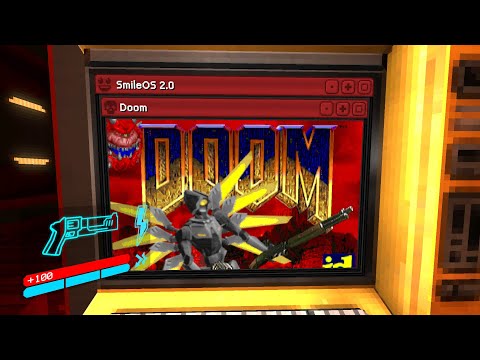
UltrakillDoom
Turns ULTRAKILL's shop terminals into playable DOOM. Bring a legitimate or shareware DOOM WAD.
Doom in the ULTRAKILL terminals See the README below for details.
README
On GitHubRomero Approved:
A simple ULTRAKILL mod to add DOOM to the shop terminals. Ingame, press the smile icon in the top left to open/close DOOM. Your mouse does not control DOOM so you can look away from the terminal to walk away.
To install, place the ultradoom dll in the plugins folder. Then in plugins/doom place your DOOM.WAD file (sourced from a legitimate copy of the game), RLNDGM.SF2 (the soundfont), and the ultradoom.wad file (to do the texture swaps). This is a Bepinex plugin so you will need to install that first!
If you don't own doom, you can use the shareware version. The ultradoom.wad file is optional. Make sure all files are named correctly.
This project was built ontop of this project: github.com/xabblll/DoomInUnityInspector with patches for audio and a system to process inputs. The terminal window is done by duplicating the tip of the day screen. Each terminal should have its own instance of doom.
This code was hacked together for a yt video, it isn't great. Also only the ultrakill pixel art which was needed was made.
Hand sprites by Ross Brooks, everything else by Matthew Collier.
From the project's repository, fetched . Images load from GitHub.
Releases
FeedNo releases yet. Follow the project to hear when the first one comes out.
Works for me
Did it work on your PC? A quick report tells other players which versions are safe to try.
Discussion
No posts yet. Ask a question, share your setup or post a clip.
Sign in to post